Case study · 18 min read
Pinecrest Academy.
A Nevada school with five campuses under one name ran on paper. We built the platform that made all five visible from one screen.
Pinecrest Academy came to us running five campuses the way most schools ran until the 1990s: enrollment on paper forms, fees written into ledgers, attendance taken from memory at the end of a period, and a head office that could tell you how a single campus was doing only by phoning it and waiting for someone to go and check.
Over five build phases we replaced all of it with a single school management platform covering student profiling, finance, communications, attendance and HR across every campus, plus a parent app and a staff app that put the same information in front of the people who actually needed it, instead of behind an office door.
This case study follows the build in the order it happened, because the order was not incidental. Every later module depended on the one before it existing first, and the sequencing is most of the argument for why the whole thing worked.
- Client
- Pinecrest Academy
- Sector
- Private education · Multi-campus schooling
- Market
- Nevada, US: Cadence, Inspirada, Sloan Canyon, St. Rose and Horizon
- Engaged
- 2025 to present
- Engagements
- One core build, five phased modules, plus ongoing maintenance
- Divisions
- Engineering
- Products shipped
- School management platform · Parent app · Staff app
- Status
- Live across all 5 campuses.
5
Campuses on one system
850+
Students enrolled
620
Families on the parent app
110
Staff
28
Fee types configured
6
Departments on payroll
Contents
Chapter 01
Everything lived on paper
You cannot understand why the modules shipped in this order until you understand what not having them cost the office every week.
Pinecrest Academy runs five campuses across the Las Vegas Valley, each carrying the same name with its neighbourhood after it: Cadence, Inspirada, Sloan Canyon, St. Rose and Horizon. Every campus takes students through the same curriculum with its own local character and co-curricular focus, and every campus ran its own paperwork, in its own filing cabinets, in its own way.
None of it talked to any of it. A family that moved a child from the Inspirada campus to Cadence did not move a record, they started a new one. A parent who wanted to know whether last term's fee had actually been paid called the campus office and waited for someone to go and look. A head office trying to compare enrollment across all five campuses had to ask each one to send numbers by email, then reconcile five different formats by hand.
What five paper systems actually cost
None of this showed up as one dramatic failure. It showed up as hours, every week, spent finding things a system should have been able to answer instantly, and it showed up as the specific kind of anxiety that comes from not being sure the number in front of you is the current one.
What kept going wrong
- A student's full record (enrollment, family contacts, fee history, attendance) existed in several separate physical places, and no two of them were guaranteed to agree.
- Fee collection was a voucher printed by hand and a payment recorded in a ledger, so a parent who paid at the wrong campus, or paid half now and half later, created a reconciliation problem someone had to untangle manually.
- Attendance was a note taken from memory. Late arrivals, an athlete travelling for a competition, a day taken as sick leave: all of it lived in a book that only existed on one campus, in one person's handwriting.
- Parents had no visibility into anything. The only channel into the school was a phone call to a campus office during office hours, for every kind of question, from a fee query to a transfer request.
- Staff attendance and leave were tracked separately from payroll, so payroll for 110-plus staff across five campuses was a monthly exercise in cross-referencing two records that had never been designed to agree.
- Nothing was comparable across campuses. Head office could not see, in real time, which campus was ahead on collections, which had open transfers piling up, or which had an attendance problem developing.
What the client actually wanted
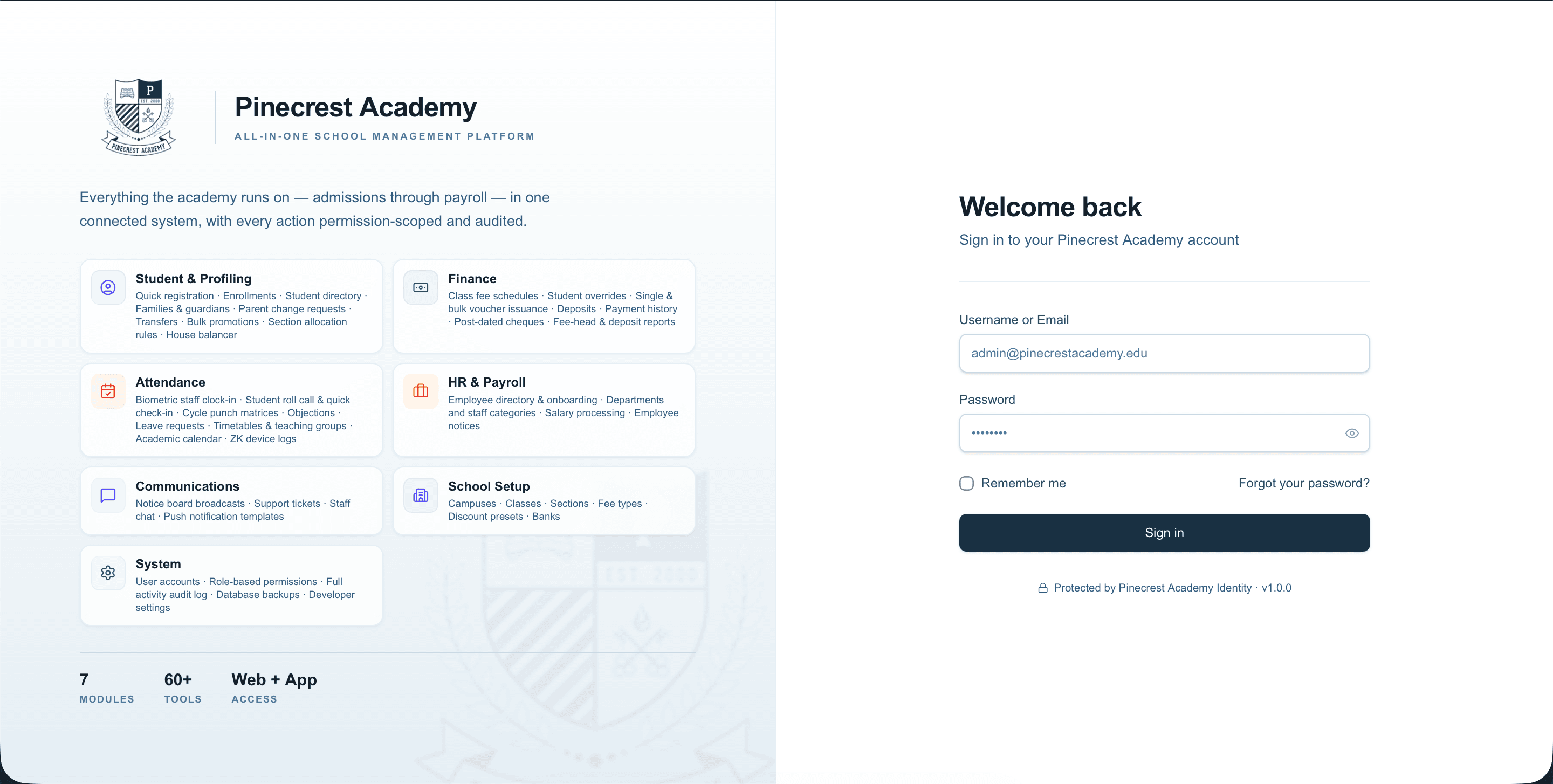
The brief was not "build us an app". It was narrower and better: reduce the risk of losing things, and make it possible to know what is happening at any campus without phoning it. Visibility and durability, in that order. Everything downstream came out of those two words.

Chapter 02
One system, five campuses, before a single feature
The first thing we built was not visible to a single parent. It was the structure everything else would stand on.
The instinct on a project like this is to start with the feature the client asks for loudest, which is usually finance. We started with School Setup and Student Profiling instead, because finance, attendance, communications and HR only make sense once the system agrees on what a campus is, what a class is, and who a student actually is.
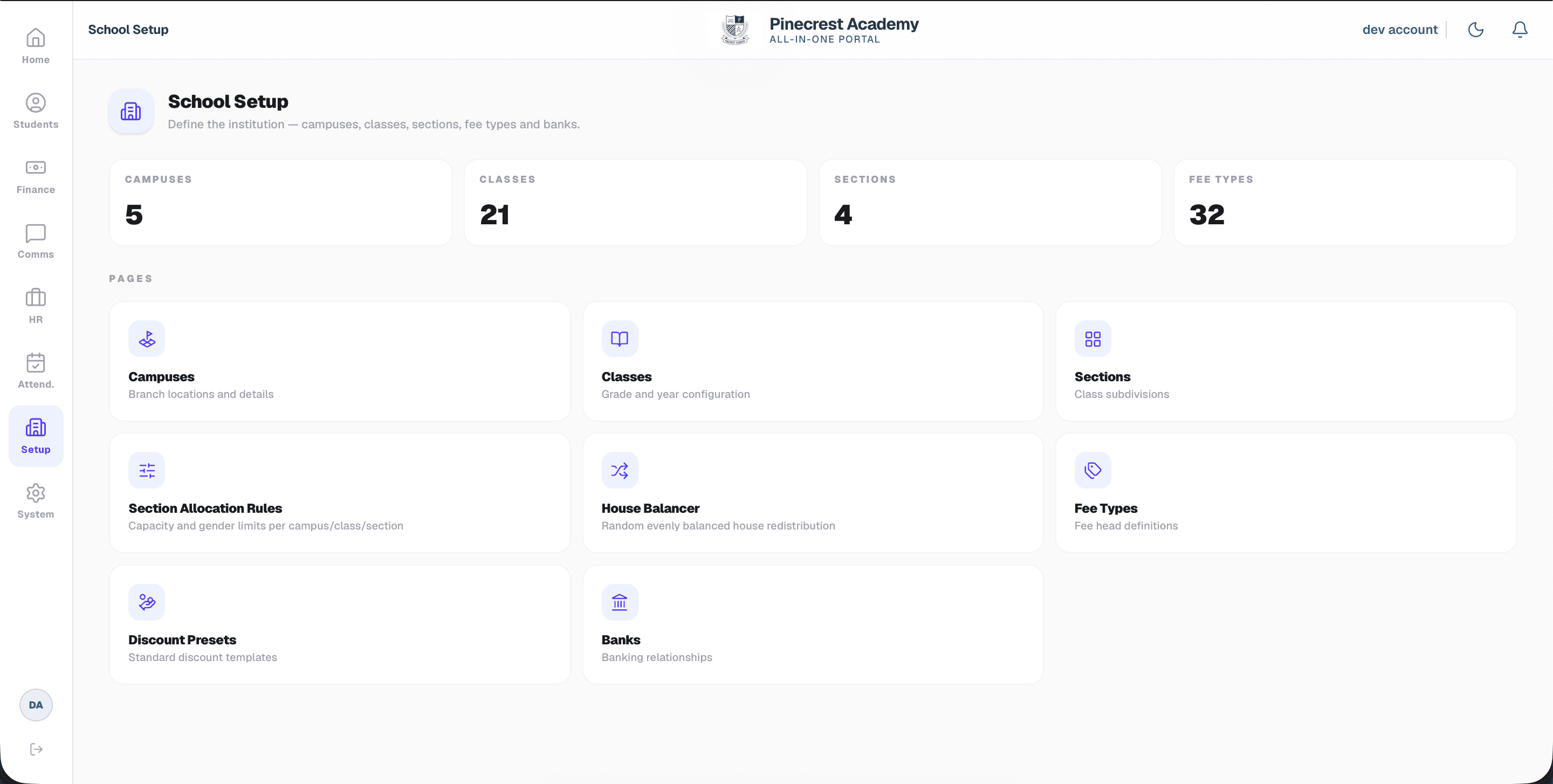
School Setup defines the institution once, centrally: five campuses, eighteen classes spanning primary and secondary, sections within each class, twenty-eight distinct fee types, and the banking relationships each campus needed for deposits. Every other module reads from this. Change a campus's name once, and it is correct everywhere it appears, instead of correct only on the campuses someone remembered to update.
Section allocation, and the house system
A school with a strong co-curricular sport program has a constraint an ordinary single-campus school does not: sections need to balance not just headcount, but training-squad gender limits and composition, per campus, per class. We built Section Allocation Rules so an admin sets capacity and gender limits once per campus and class, and the system enforces them at enrollment time rather than someone noticing after the fact that a section is over capacity or badly balanced.
Pinecrest also runs an inter-campus house system, used for internal spirit competitions and school events. Redistributing students into houses by hand, evenly, across five campuses, used to be a term-start ritual involving spreadsheets and a lot of manual counting. We built a House Balancer that does it in one action: random assignment, constrained to come out evenly balanced, in seconds instead of a day.
Registration, enrollment, and the record that follows a student
What the module covers
- Quick Registration for admissions intake that has not been confirmed yet, so an inquiry does not get lost before it becomes an application.
- Registration and Enrollment as two separate steps: registering a student is not the same moment as assigning them to a class and section, and treating them as one step was where records used to get tangled.
- A Student Directory that searches every enrolled student across all five campuses, not just the one a staff member happens to be logged into.
- Family records: guardians, contacts, and the relationships between them, attached to the student rather than re-entered per sibling.
- Parent Change Requests, so a family can request a profile update and a staff member approves it, instead of a phone call and a note nobody else sees.
- Transfers between campuses, tracked as a first-class workflow rather than a closed record at the old campus and a fresh one at the new campus.
- Academic Actions for bulk promotions and end-of-year moves, run once across a cohort instead of once per student.

Chapter 03
Making a fee payment feel like a normal thing to do
The old process made paying a fee an errand. The new one made it a notification a parent could act on from a phone.
Finance was the module the client had been waiting for since the first conversation, and it is also where the paper process hurt the most: a printed voucher, a trip to the campus or the bank, a payment recorded by hand, and a parent with no way to check any of it without calling.
We built the finance module and the parent app in the same phase, deliberately, because a finance system nobody outside the office can see is only half solved. Automating collection mattered as much as digitising it.
Fee configuration that does not fight the exceptions
A group of five campuses does not have one fee schedule, it has five, with per-class variation and a steady stream of individual exceptions: a sibling discount, a scholarship student, a mid-year fee adjustment. We built Class Fee Schedule for the default structure, campus by campus and class by class, and Student Overrides for the individual adjustments, so an exception is recorded against the one student it applies to instead of becoming a special case the whole schedule has to account for.
Discount Presets turn the recurring exceptions, the ones the office grants often enough to have a name for, into a one-click template instead of a manually typed adjustment every time.
Vouchers, and the deposit flexibility that mattered most
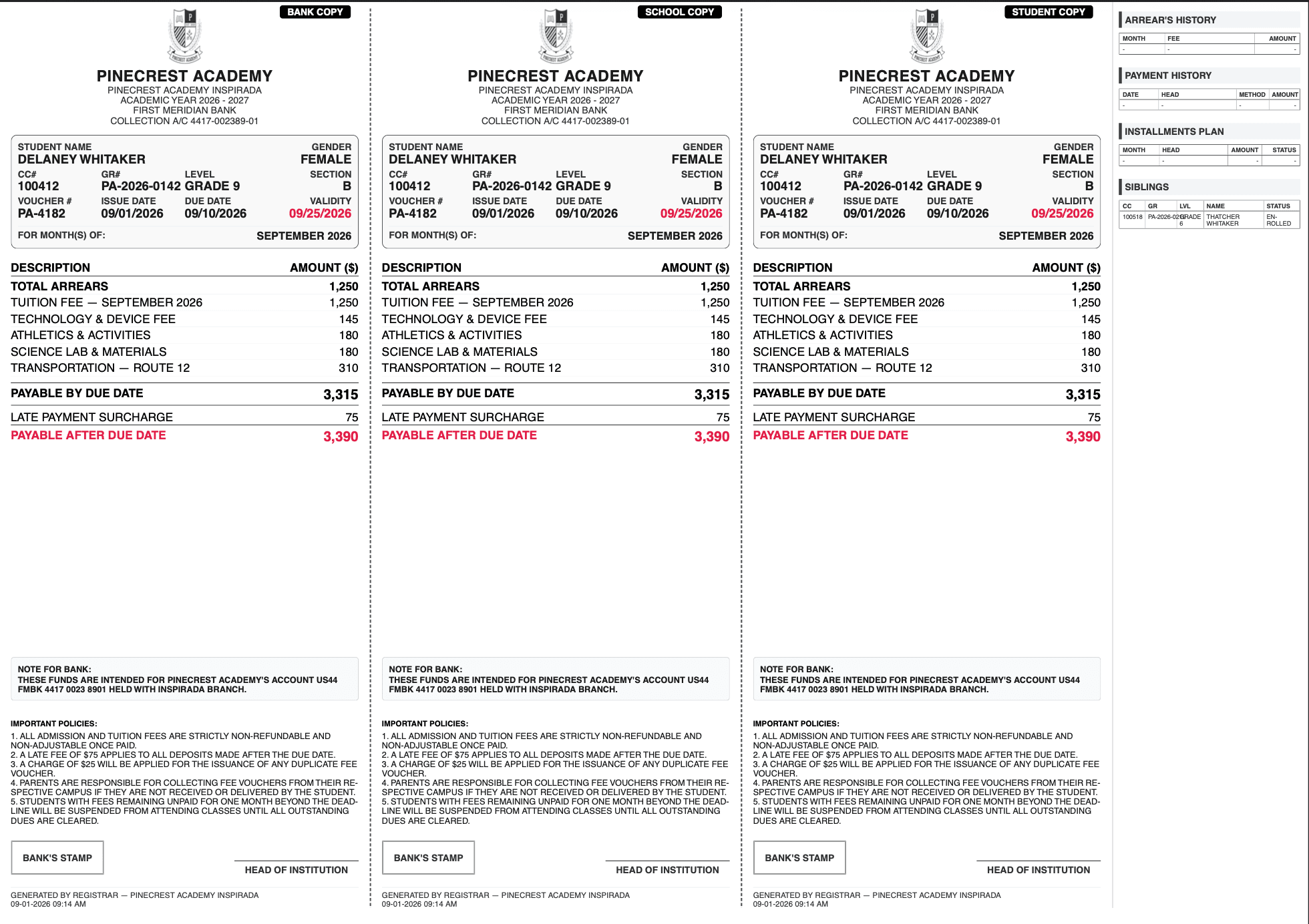
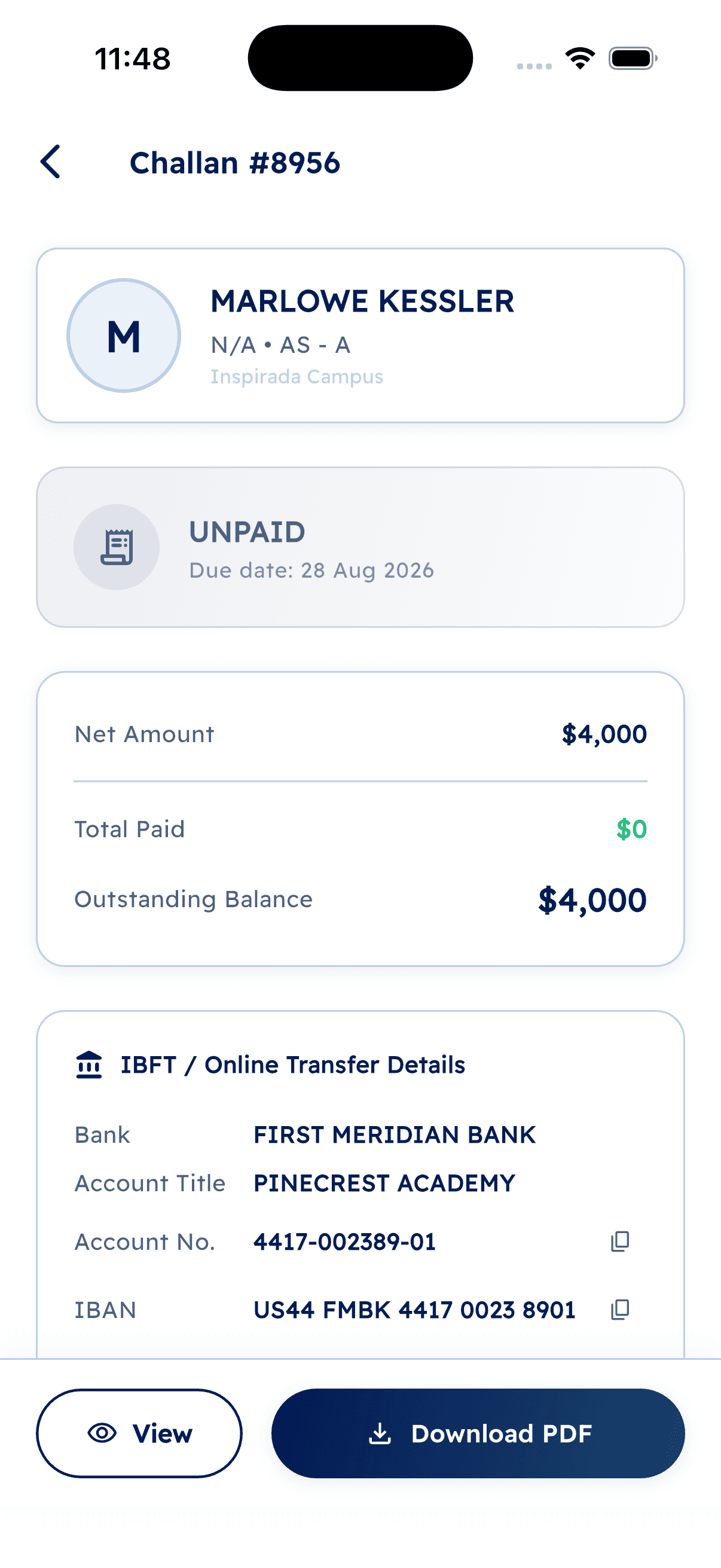
Single Voucher Issuance and Bulk Voucher Issuance cover the two real cases: printing one fee slip for one family, or generating a term's worth of vouchers for a whole campus in one action. We designed the voucher PDF itself as a real deliverable, not an afterthought: legible on a phone screen, correct when printed, and carrying exactly the reference numbers the bank side needs to reconcile a payment automatically.
The detail that mattered more than the PDF, though, was what happens when a family cannot pay a voucher in full. The old process treated a voucher as one indivisible amount. We built Receive Deposit to accept a partial payment against any voucher and split the remainder into a new voucher automatically, so a family paying in instalments generates a clean, correct paper trail on both sides instead of a manual note explaining the shortfall.
Scheduled payments, where a family arranges to pay on a future date rather than immediately, are tracked as a first-class record with reminders and status, so the office knows what is coming instead of discovering a missed instalment after the fact.
What the finance module covers
- Financial Reports: collection rate, outstanding balances and trends, comparable across all five campuses in one view
- Class Fee Schedule and Student Overrides
- Discount Presets
- Single and Bulk Voucher Issuance, with a designed, reconciliation-ready PDF
- Vouchers and full Payment History as one searchable ledger
- Receive Deposit, including partial payments and automatic voucher splitting
- Scheduled payment tracking, with alerts as a date approaches
The parent app
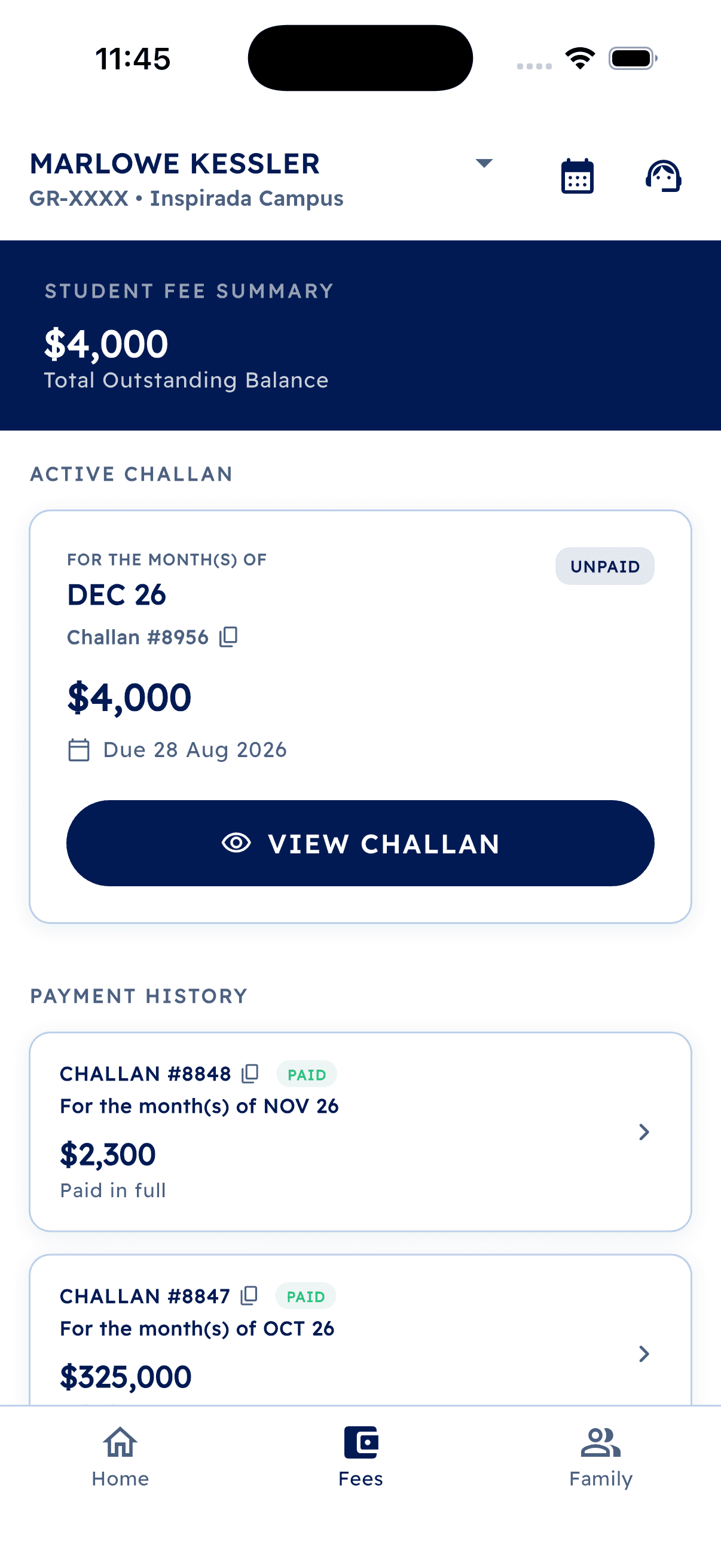
None of the above matters if a parent still has to call the office to find out whether it worked. The parent app puts a family's own fee history, outstanding balance and upcoming payments in front of them directly, and lets them pay from the app rather than a bank counter. The office stopped fielding "did my payment go through" calls, because the parent could already see the answer.
5
Campuses on one fee schedule engine
$3.2M+
Collected through the platform to date
28
Distinct fee types configured
What's owed
Voucher details
Chapter 04
A support desk, not a group chat
Parents needed a way in that was not a phone call during office hours. Staff needed the question to land with the right person the first time.
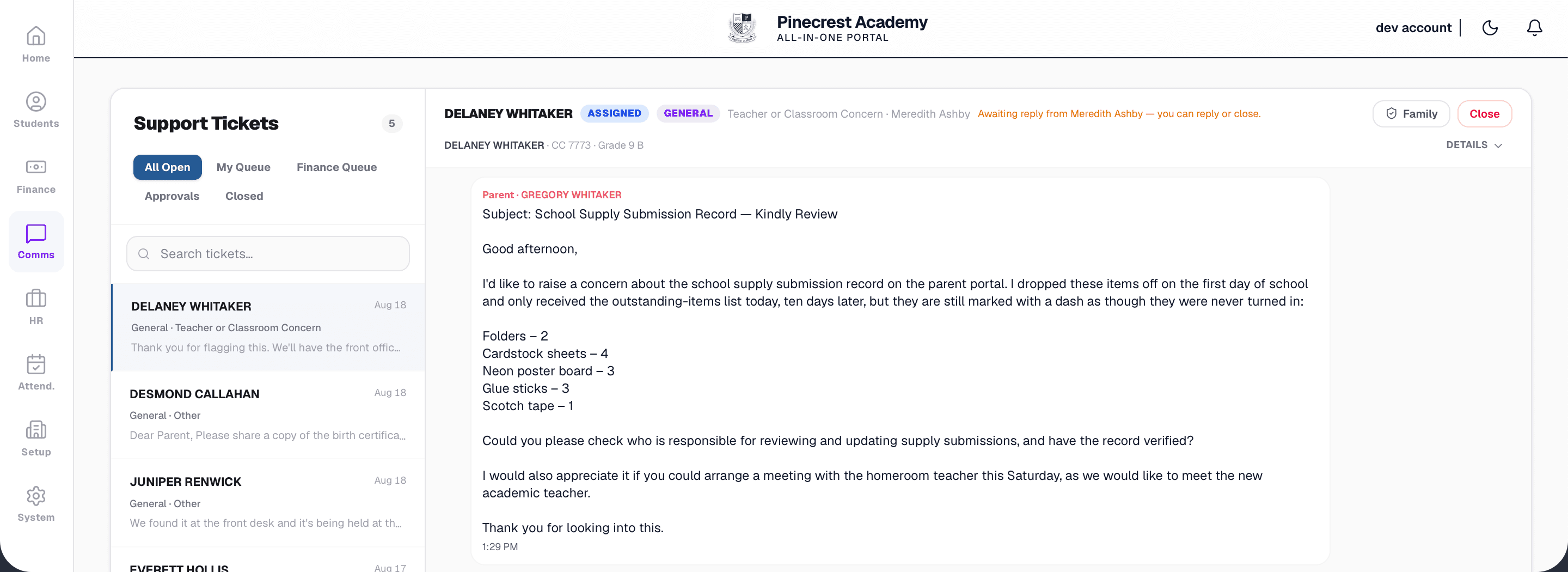
Once fees and profiles were digital, the obvious next gap was that a parent with a question still had exactly one channel: call the campus. We built a communications module that looks, from the parent's side, like a chat, and behaves, from the school's side, like a ticketing system, because those are different requirements and neither one alone was right.
A parent opens a conversation the way they would open any messaging app. Underneath, the message becomes a ticket, categorised by query type (fees, transfers, attendance, general), and routed to whichever staff member actually handles that category at that campus, rather than landing in a shared inbox where it waits for whoever happens to open it. A billing question reaches the finance officer directly. A transfer question reaches the registrar. Nobody re-reads a message to work out whose job it is.
What shipped
- Notice Board for broadcast announcements, campus-wide or system-wide
- Support Tickets: the chat interface for parents, the routed ticket queue for staff, with a visible open and resolved state
- Automatic routing by query type to the correct respondent, not a shared inbox
- Notification Templates, so the wording of a push notification is a content edit, not a code change
Chapter 05
Attendance tied to a door, not a memory
The moment attendance came from a physical device instead of a person's recollection, disputes about who was where stopped being arguments and started being records.
Attendance is the module where "digitally transform" stopped being an abstraction and started meaning hardware. We integrated the platform with ZKTeco biometric terminals installed at every one of the five campuses, for both staff and students, so a punch in or out is a timestamped device event, not a mark a teacher makes from memory at the end of a period.
That single change removed the most common dispute the client had been living with: a staff member insisting they had arrived on time, with no record either way to settle it. The device does not have an opinion. It has a timestamp.
Staff and student, on the same spine, different surfaces
Staff-facing
- Staff Register and Employee Attendance for daily clock-in and clock-out from the biometric devices
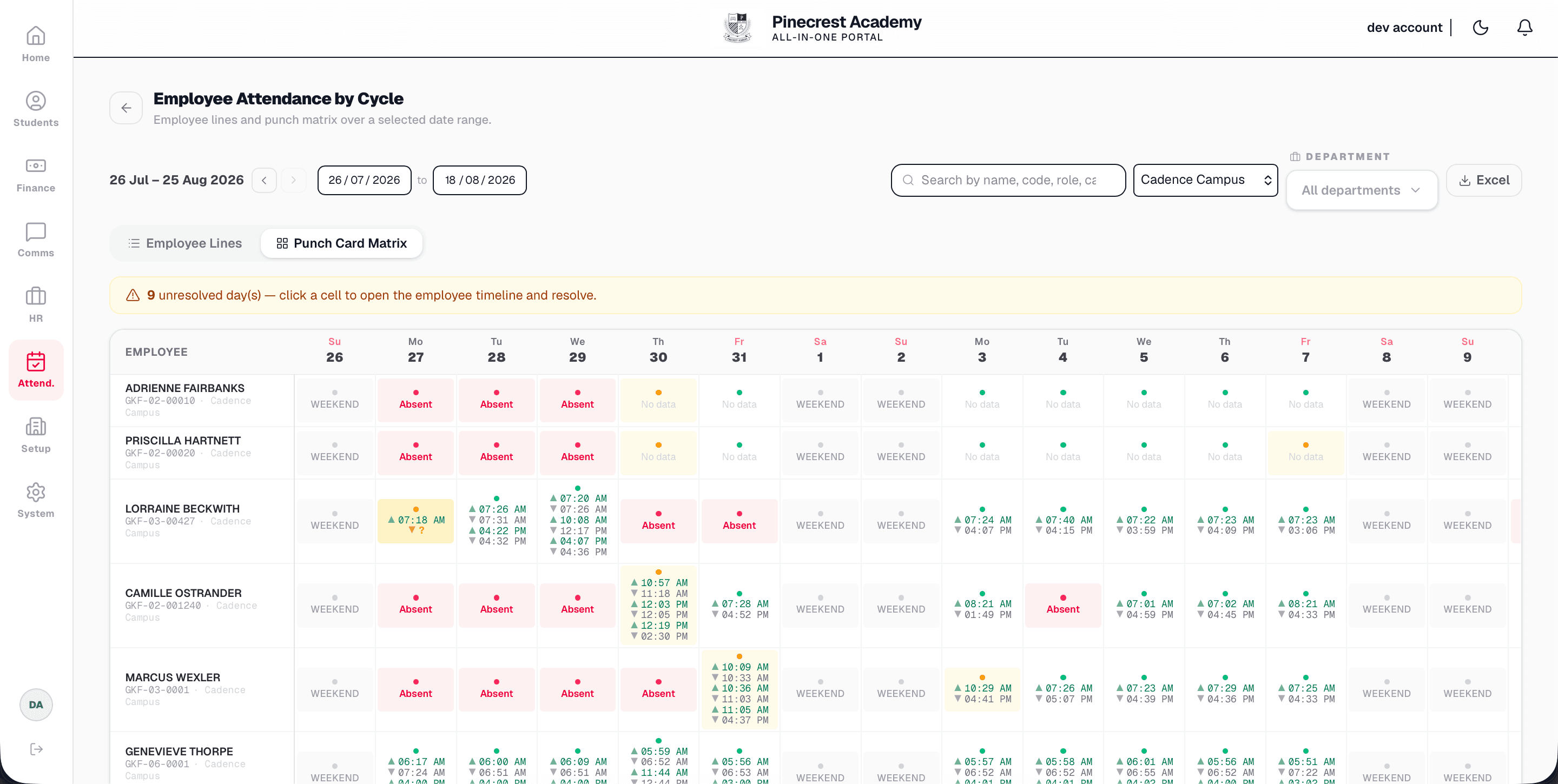
- Employee Attendance by Cycle: punch matrices over a date range, so a pattern (chronic lateness, an unusual absence run) is visible instead of buried in daily logs
- Attendance Objections, so a disputed punch has a formal review path instead of a conversation nobody records
- Leave Requests, reviewed against the same attendance record rather than a separate paper form
Student-facing
- Student Attendance per class, and the same by-cycle punch matrix view used for staff
- Quick Check-In: search a student and punch them in or out directly, for the cases a badge or biometric scan cannot cover
- Roll call tooling built specifically for upper-secondary sections, where attendance is taken per subject group rather than per homeroom
Scheduling that understands an athlete's calendar
A network running five campuses across one metro area, with a serious co-curricular sport program, does not have a normal timetable. Squads travel for away fixtures, and a class scheduled as in-person on paper is sometimes a class the coach and half the squad are attending from another campus or a game across town. We built that reality into the module rather than treating it as an exception.
Scheduling and configuration
- Timetables for upper-secondary weekly schedules, and Teaching Groups for subject classes with their own enrollment, separate from homeroom sections
- A Weekend Training Rota tracking which coaches are committed to weekend training blocks, so coverage is planned rather than assumed
- Shift Overrides, so a campus or a specific segment (a squad away at competition) can have its check-in and check-out times overridden for specific days without touching the default schedule
- Class Modes, marking a class as in-person or remote when a squad is travelling, so attendance expectations match where people actually are
- An Academic Calendar shared across all five campuses, so a competition weekend or a public holiday is one entry, not five
- Attendance Settings for the thresholds (what counts as late, how objections are handled) and ZK Device Logs, the raw record from every biometric terminal, kept as the audit trail underneath everything else
The staff app followed the same logic as the parent app: put the record in front of the person it is about. A coach can see their own attendance history and submit a leave request from a phone between training sessions, instead of finding the one person at head office who has the paper form.
5
Campuses on biometric attendance
110+
Staff clocked in daily
850+
Students on the same attendance spine
Chapter 06
Payroll, once attendance could actually feed it
We built HR last on purpose. Payroll only works once attendance is a record you can trust, and that took five phases to earn.
HR and payroll came after everything else deliberately. Payroll for a staff of over 110, across five campuses and six departments (teaching, sport and coaching, administration, facilities, wellbeing and enrollment), depends on an attendance record accurate enough to calculate against, and that record did not exist reliably until the biometric integration in the previous phase had been running for a full term.
Building payroll against the old, paper-based attendance data would have meant building it against numbers the client themselves did not fully trust, which produces a payroll system nobody wants to actually run a payroll through.
What shipped
- Employee Directory: staff profiles and records, department by department
- Register a New Employee, replacing a paper onboarding file
- Departments, as staff categories that feed both org structure and payroll grouping
- Payroll: salary processing that reads directly from the attendance and leave records the previous phase established, so a payroll run is a calculation against real punches, not a manual reconciliation
- Employee Notices, for broadcasting announcements to staff by role rather than to everyone
Chapter 07
Where it stands
Five campuses, one system, and a client who can now answer "how are we doing" without a phone call.
Pinecrest Academy now runs student profiling, finance, communications, attendance and HR for all five campuses inside one platform, with a parent app and a staff app putting the record in front of the people it concerns instead of behind an office door. The specific fear the client started with, that something would get lost because it only existed on paper in one filing cabinet, is no longer a live risk for anything the platform covers.
The build happened in the order it did because each module needed the one before it to mean anything. Finance needed a student to attach a voucher to. Attendance needed a student and a staff record to attach a punch to. Payroll needed attendance data solid enough to calculate a salary against. That was not a plan drawn up on day one so much as the honest dependency order, phase by phase.
We used to find out how a campus was doing by calling it. Now we open a dashboard.
The parent app stopped the "did my payment go through" calls almost overnight.
How it ran.
- Phase 01DiscoveryMapping what lived where, across five campuses' worth of paper: student records, fee ledgers, attendance books and staff files.
- Phase 02School setup and student profilingCampuses, classes, sections, fee types and banks defined once. Registration, enrollment, families, transfers, the House Balancer.
- Phase 03Finance and the parent appFee schedules, discount presets, voucher issuance and PDFs, flexible partial deposits with automatic splitting, and a parent app for visibility and payment.
- Phase 04CommunicationsA chat-style, ticket-based support system for parents, routed to the correct staff member by query type.
- Phase 05Attendance and the staff appBiometric device integration across all five campuses, staff and student attendance, athlete-aware scheduling, and a staff app.
- Phase 06HR and payrollEmployee directory, departments and payroll processing, built once attendance data was trustworthy enough to calculate salaries against.
- OngoingMaintenance and roadmapAll modules, same team.
What we delivered.
Engineering.
- School setup: campuses, classes, sections, fee types, banks
- Student profiling: registration, enrollment, families, transfers, academic actions
- Section allocation rules and the House Balancer
- Finance: fee schedules, discount presets, voucher issuance and design, payment history
- Flexible deposits with automatic voucher splitting and scheduled payment tracking
- Parent app: fee visibility, payments, support tickets
- Communications: notice board, ticket-based support routed by query type
- Biometric attendance integration (ZKTeco) for staff and students across 5 campuses
- Athlete-aware scheduling: timetables, teaching groups, weekend training rota, shift overrides, class modes
- Staff app: attendance history, leave requests
- HR and payroll: employee directory, departments, attendance-linked salary processing
- Ongoing maintenance and roadmap
Under it.
Web
- Server-rendered admin and staff web application
- Relational database, one student and staff model across every module
- PDF generation for fee vouchers, built for reconciliation
Mobile
- Parent app: fees, payments, support tickets
- Staff app: attendance, leave requests
- Push notifications for fees, announcements and ticket replies
Integrations
- ZKTeco biometric device integration across all 5 campuses
- Payment gateway and bank reconciliation
What we would take from this one.
- 01Start where every other record depends on itStudent profiling looked like the least urgent module and shipped first anyway, because finance, attendance and HR are all, underneath, records attached to a student or a staff member.
- 02Digitising a process and automating it are different jobsA finance module nobody outside the office can see only solves half the problem. The parent app, shipped in the same phase, is what actually stopped the phone calls.
- 03Build the exception path, not just the happy pathA voucher a family cannot pay in one go is not an edge case in this market, it is a normal Tuesday. Partial deposits with automatic splitting mattered more than the payment gateway sitting next to them.
- 04Sequence the trust-critical modules lastPayroll went in sixth, not first, because it needed an attendance record solid enough to calculate a salary against. Building it earlier would have meant building it on numbers nobody trusted yet.
- 05A record beats a memoryThe single change that ended the most disputes on this project was replacing a teacher's end-of-period recollection with a biometric device's timestamp. Visibility was the brief. This is what visibility actually looked like in practice.
Still to come.
- End-to-end payroll disbursement, not just calculation
- Recurring standing-order payment collection in the parent app
- Predictive collection analytics per campus
- Extending the platform to additional campuses as the group grows
Got something at the stage Pinecrest Academy was at?