Case study · 15 min read
Ampere.
An EV charging network for Oman, built as four separate applications that all read from the same live charger data.
Ampere came to us with charging terminals already going into the ground across Oman: fast chargers at malls, destination chargers at hotels, a scattering of stations along the corridors out of Muscat. Different installers put them in. Different owners hosted them. Nothing about one charger agreed with anything about the next one, and nobody, not the driver looking for a free bay, not the company that installed the unit, not the site that hosted it, had a single place to check on it.
We built four applications on one shared platform, one for each of the people who actually touch a charger: a driver app to find and pay for a charge, a dashboard for the terminal owner hosting the bay, a console for the vendor who installed and maintains it, and an admin platform for the Ampere team running the network underneath all three. Same terminals, same sessions, same faults, four different jobs to do with that data.
This case study goes through each of the four in turn, then the part underneath all of them: the OCPP 1.6J connection that makes 'available now' something the app actually knows, rather than something a listing hopes is still true.
- Client
- Ampere
- Sector
- EV charging infrastructure · Multi-sided platform
- Market
- Oman: Muscat, Sohar, Salalah, Sur, Barka
- Engaged
- 2026 to present
- Engagements
- One build across four applications
- Divisions
- Engineering
- Products shipped
- Driver app · Vendor dashboard · Terminal owner dashboard · Admin console
- Status
- Live across Muscat, Sohar and Salalah. Onboarding more vendors and owners.
4
Role-based applications, one platform
3
Web dashboards: vendor, owner, admin
OCPP 1.6J
Direct terminal integration protocol
9
Modules in the terminal owner dashboard
8
Modules in the vendor console
4
Charger tiers, from listed to sensor augmented
Contents
Chapter 01
A charger network without a network
Oman's chargers were going in one installer at a time. Nothing about the country's charging network agreed with anything else that ran it.
A charging terminal is not one product with one user. The company that installs it needs to know if it is still working. The site that hosts it needs to know what it earned this month. The driver just needs to know if it is free right now. Before Ampere, all three of those questions had the same answer: call someone and ask, or drive over and look.
That is not a software gap so much as a coordination gap. Every installer in Oman was, reasonably, building for their own fleet. A driver ended up needing to know which company installed which charger before they could even find out if it was free, which is a question nobody should have to answer before they can charge a car.
Four roles, one schema
The brief was not one app with four logins bolted on. Each role does a genuinely different job against the same underlying charger, and the data model was built around that from the start: a terminal, a session and a fault look the same everywhere, but what each role is allowed to see and do with them is different by design, not by a flag checked in the UI.
Who sees what
- Driver
- Find a charger, see it live, start and pay for a session, from a phone.
- Terminal owner
- The site hosting the bay. Revenue share, pricing control, and who they buy the next install from.
- Vendor
- The installer and maintainer. Every unit they have ever put in, its health, and the customer relationship.
- Platform admin
- The Ampere team. Every vendor, every owner, every driver, and the switch that keeps it all straight.
Role, What they get
One identity across four apps
Whichever app you open, the same identity carries across: a lime green mark against near black, the same leaf-and-plug logomark in the top left, the same type. A driver charging a car and an admin reviewing a fault ticket are looking at two very different screens built from the same system, not two different products that happen to share a name.
The system: Gotham for headings, DM Sans carrying every other piece of type, and one signature colour — #c1f21d — doing all the accent work against near black.
Chapter 02
The driver app: a live status, not a pin
A driver does not want a list of chargers that might exist. They want to know, before they leave, whether the nearest one is actually free.
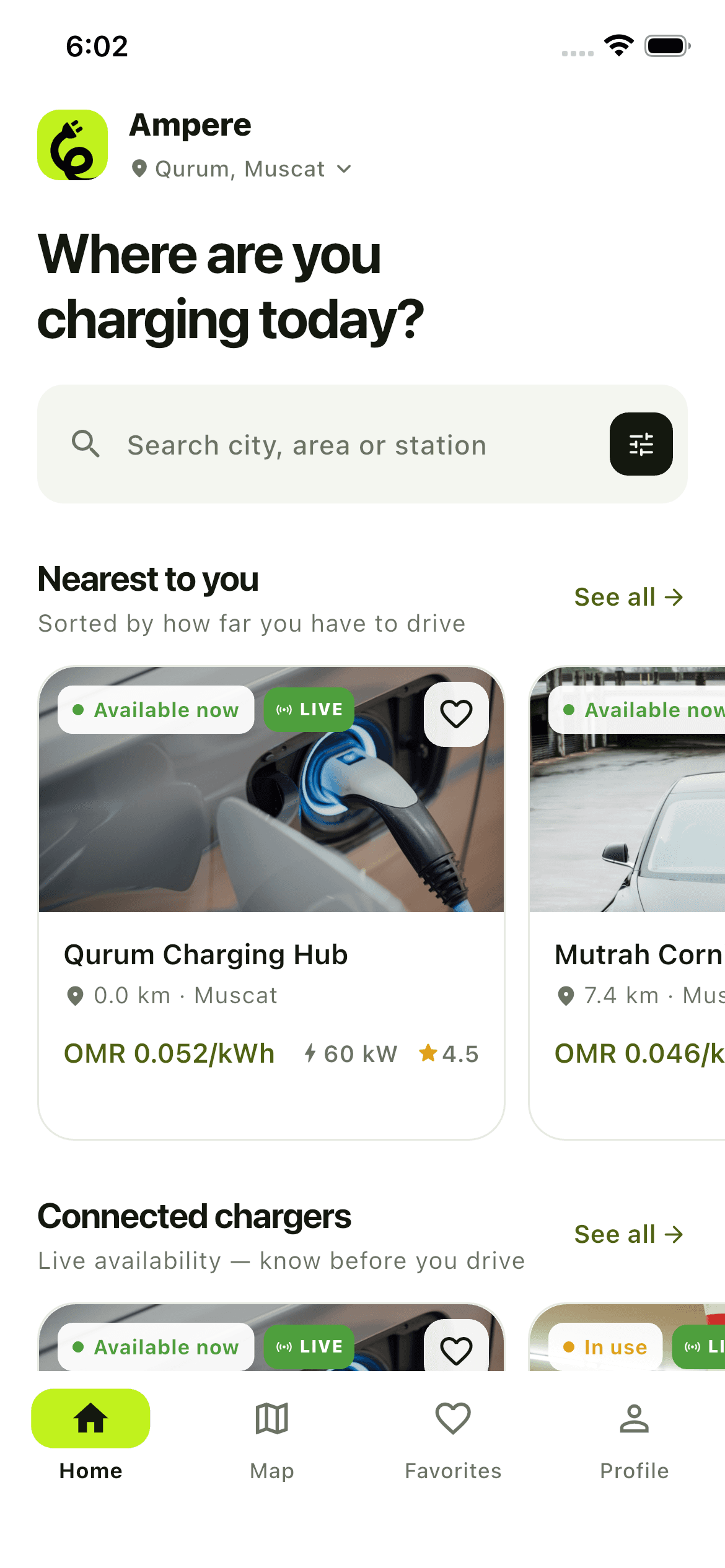
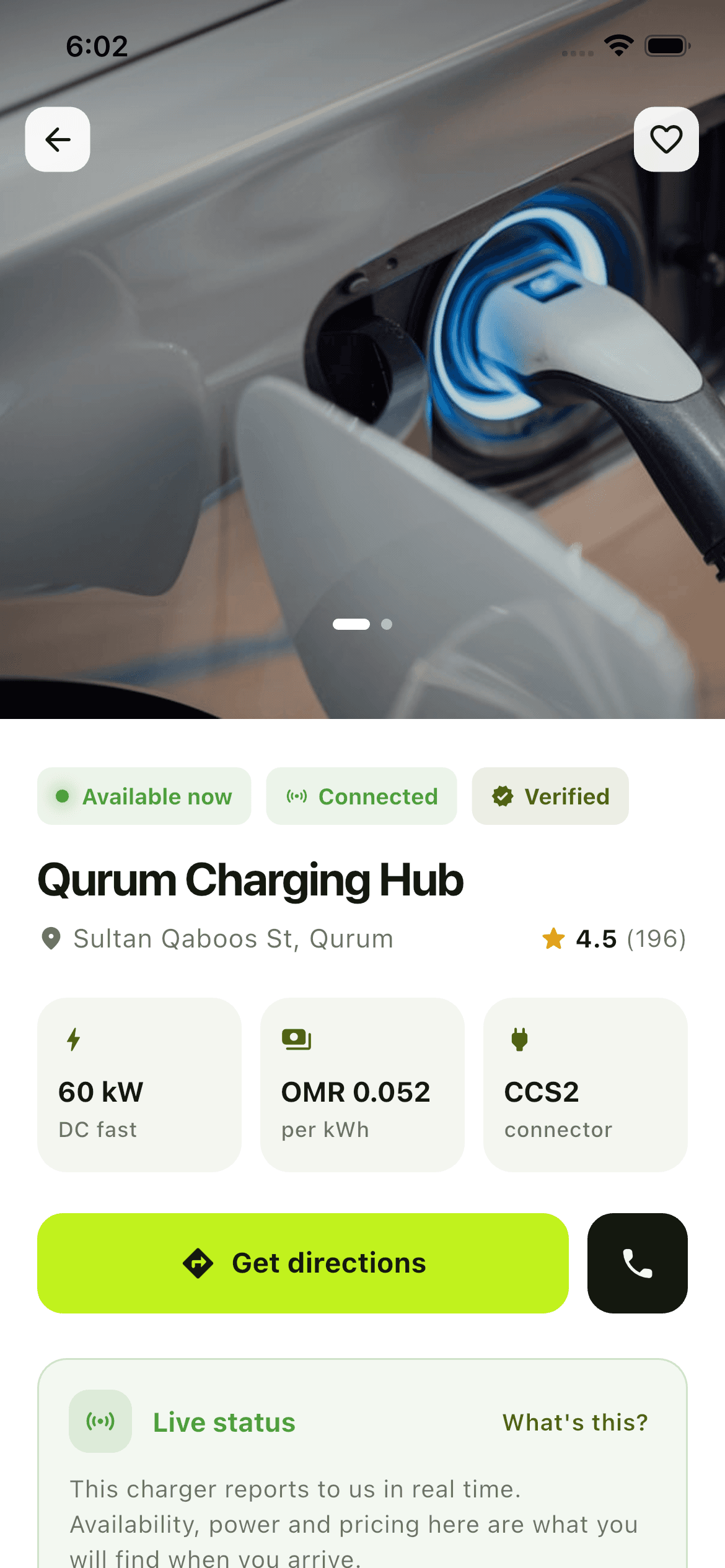
Home opens on one question: where are you charging today. Nearest chargers come first, sorted by distance, each card showing price per kWh, power output and a rating before the driver taps anything. A green 'Available now' badge and a 'LIVE' tag sit on every card that is actually reporting status, which matters more than it sounds: on a network built from chargers at different stages of connection, the app never claims a status it cannot back up.
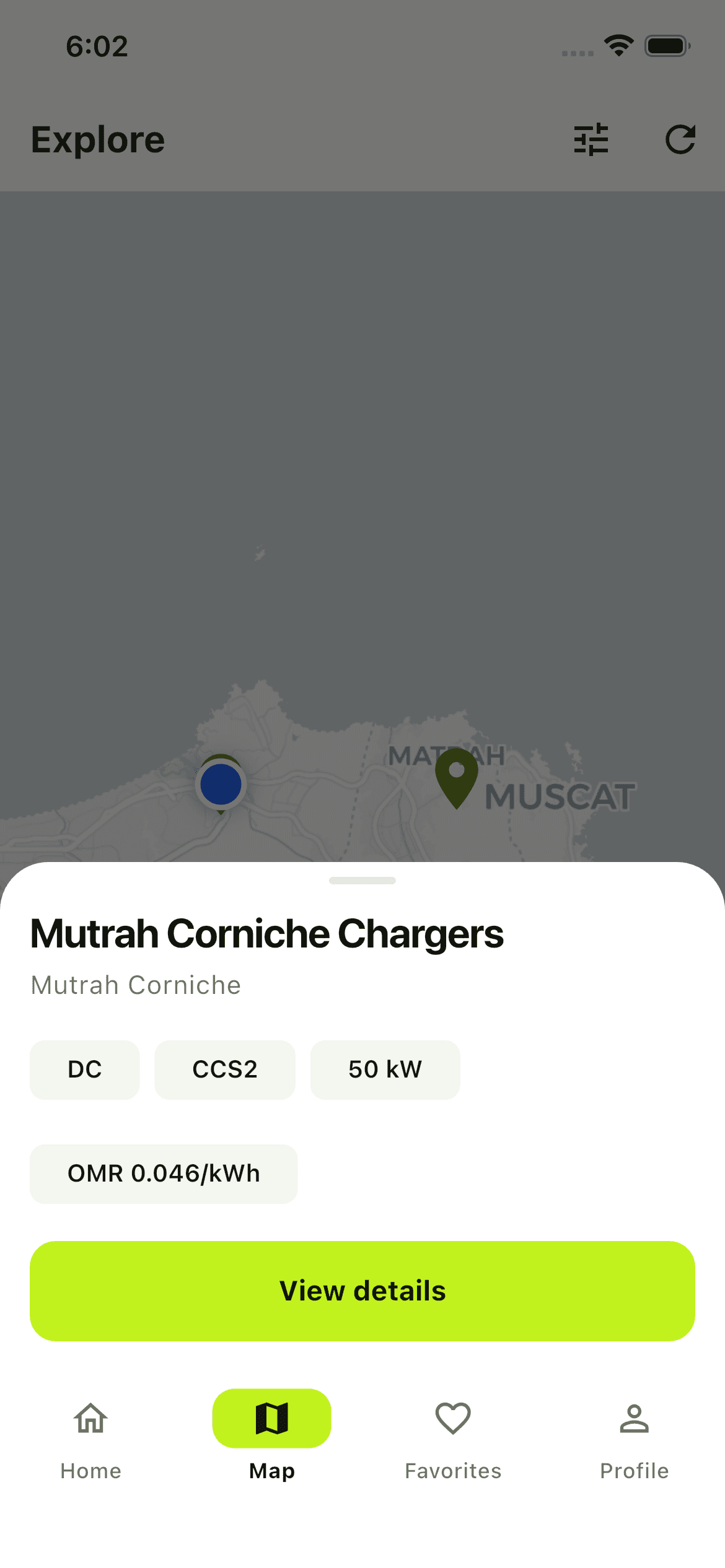
The map view is the same data, laid out geographically instead of by distance. Tap a pin and a sheet slides up from the bottom with the connector type, power and price, and a single 'View details' button, no dead-end taps, no separate screen to load before the driver can decide whether this is the right charger.
Home
Map
Detail
The charging screen is the whole pitch
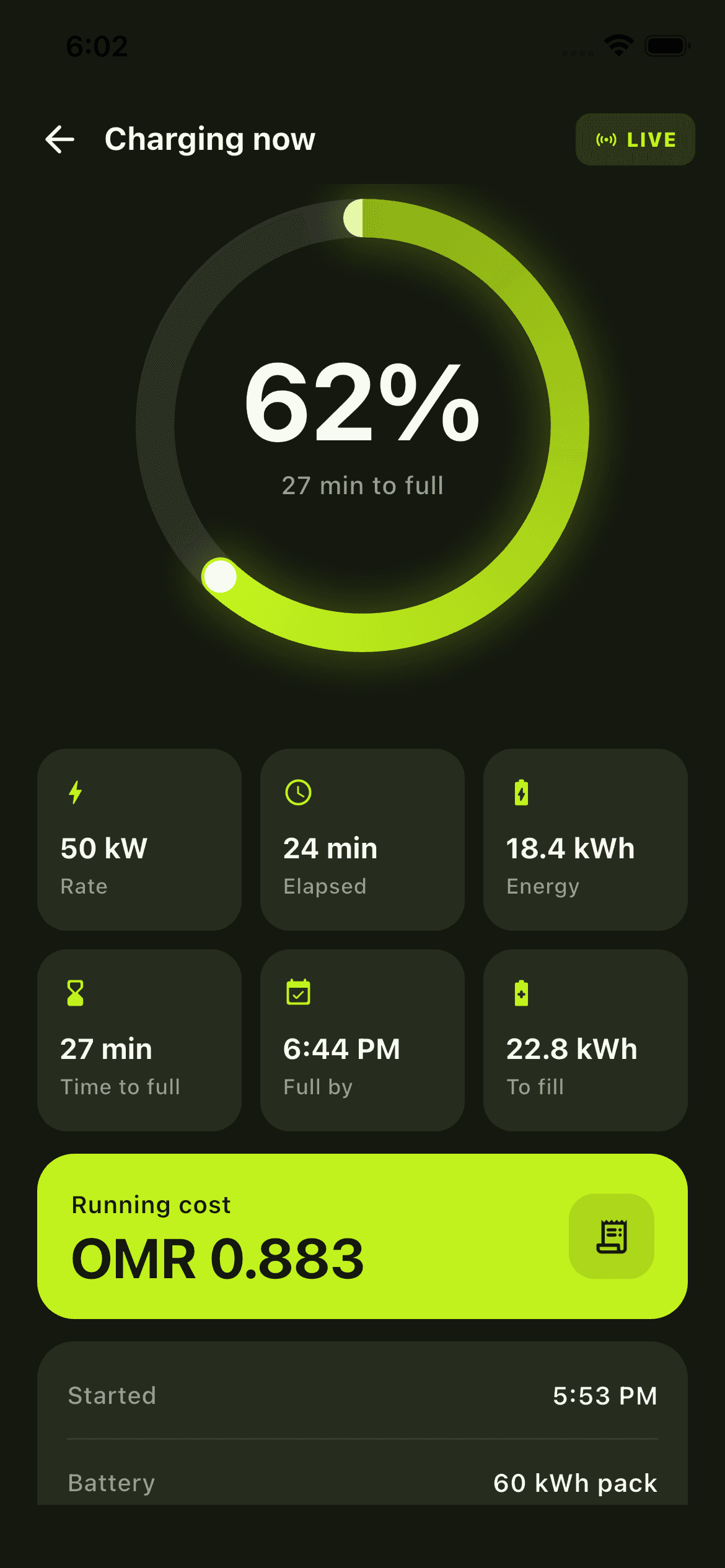
Once a session starts, the screen most drivers actually stare at is the charging screen: a ring that fills as the battery does, time to full, energy delivered, and a running cost in OMR that updates as the session goes, not a total that appears once at the end. That live number is the argument for connecting a charger rather than just listing it: a driver who can see the cost accumulate in real time never has to wonder whether the price at the plug matches the price on the sign.
Chargers that are only listed, not connected, still show up on the map, so the network stays complete even before every installer has wired their fleet in. They simply do not carry the live badge, and they cannot be started from the app, which is the honest version of the distinction rather than a hidden one.
Chapter 03
Terminal owners: what a charger is actually doing
The owner already paid for the hardware. What they never had was a way to see what it was earning, or a way to buy the next one without starting from zero.
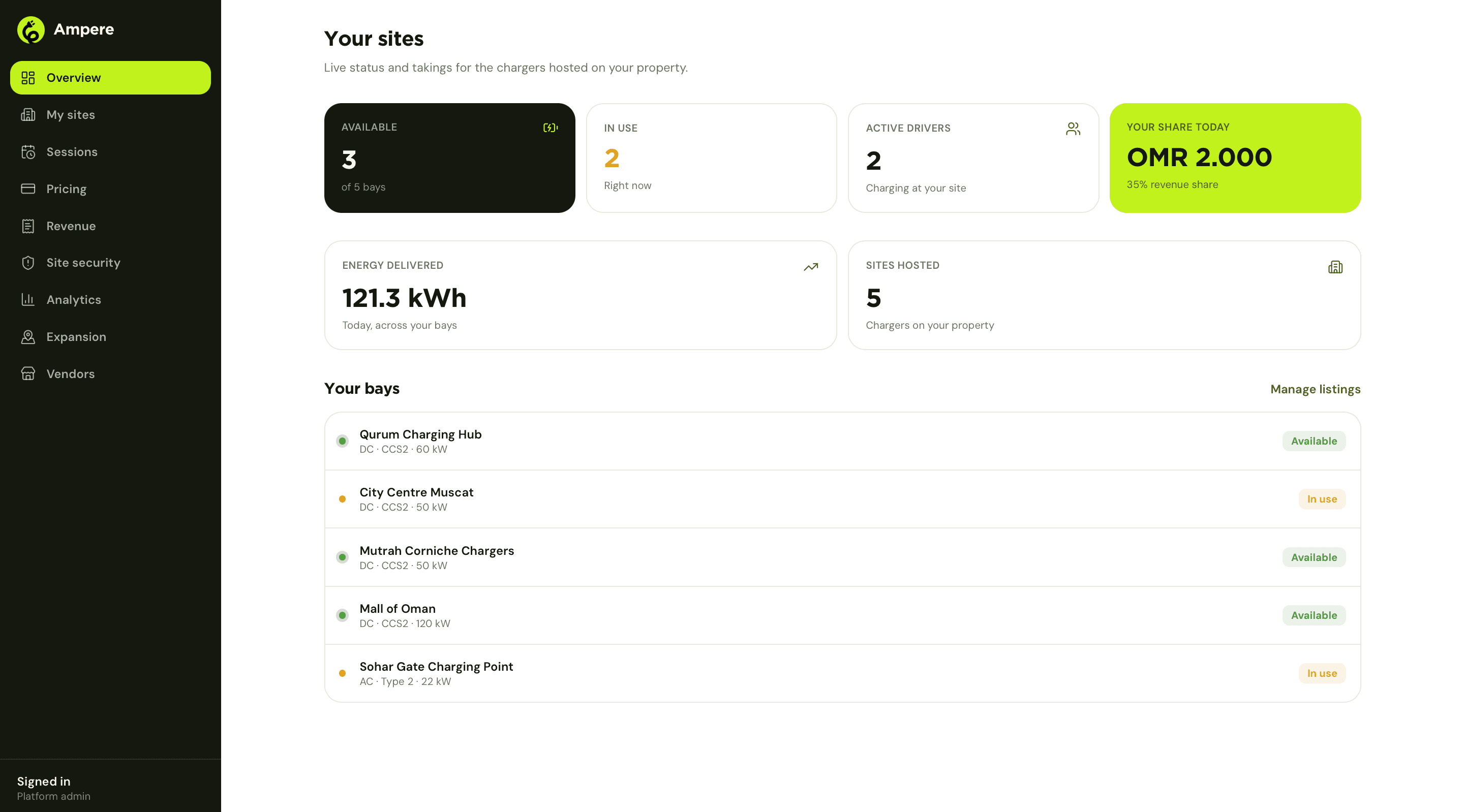
A terminal owner is not an engineer and does not want to be one. The overview screen is built around the four numbers that actually decide whether hosting a charger was worth it: how many bays are available right now, how many are in use, how many drivers are actively charging, and, in a lime highlight impossible to miss, the owner's own revenue share for the day. Energy delivered and total bays hosted sit underneath, and a list of every bay with its live status closes the page.
The listing is the owner's, not ours
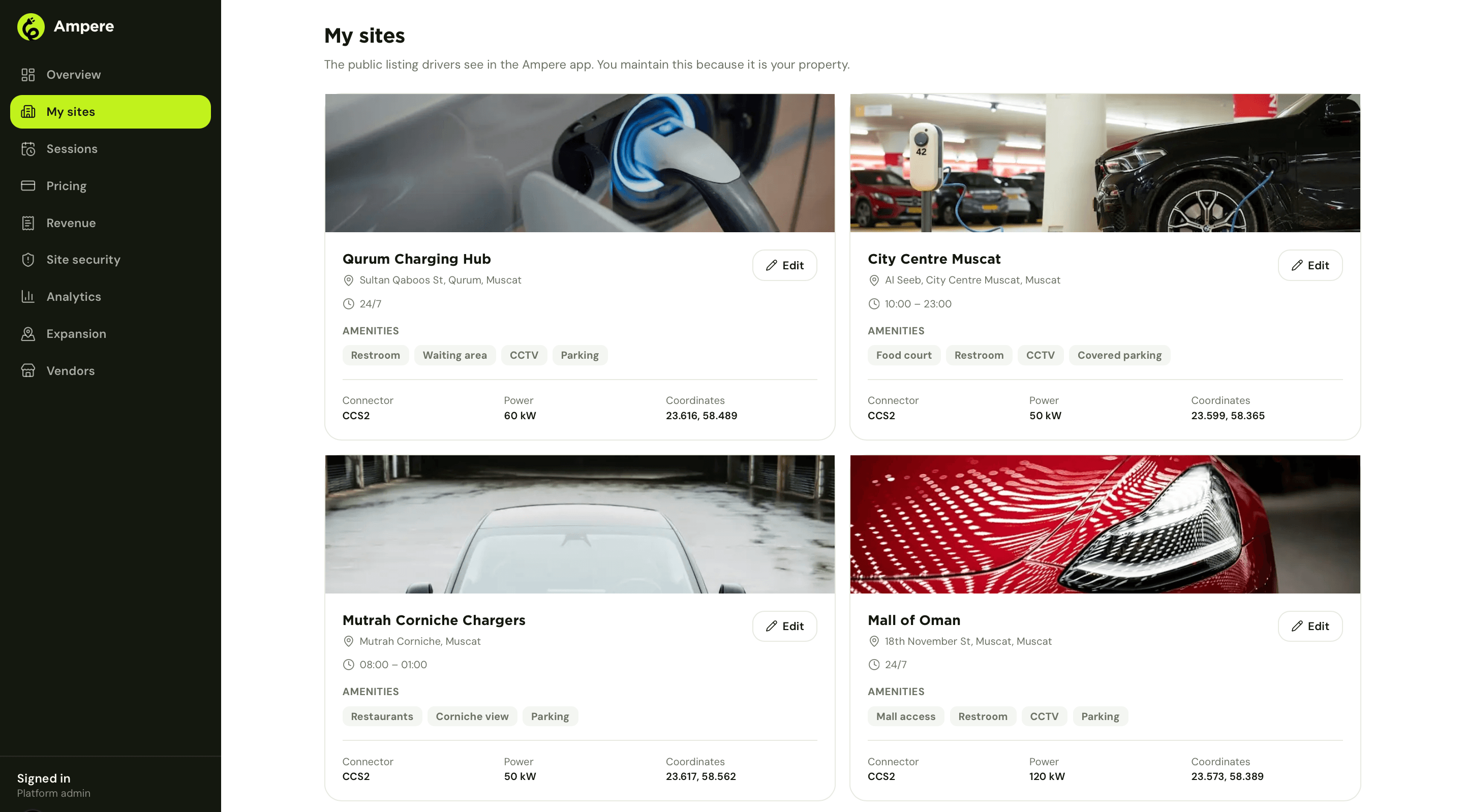
My sites is the public listing a driver sees in the app, and it belongs to the owner because the property does. Photos, hours, amenities, connector type and power, all editable directly, because nobody at Ampere knows a mall's food court hours better than the mall does.
Pricing and the share, side by side
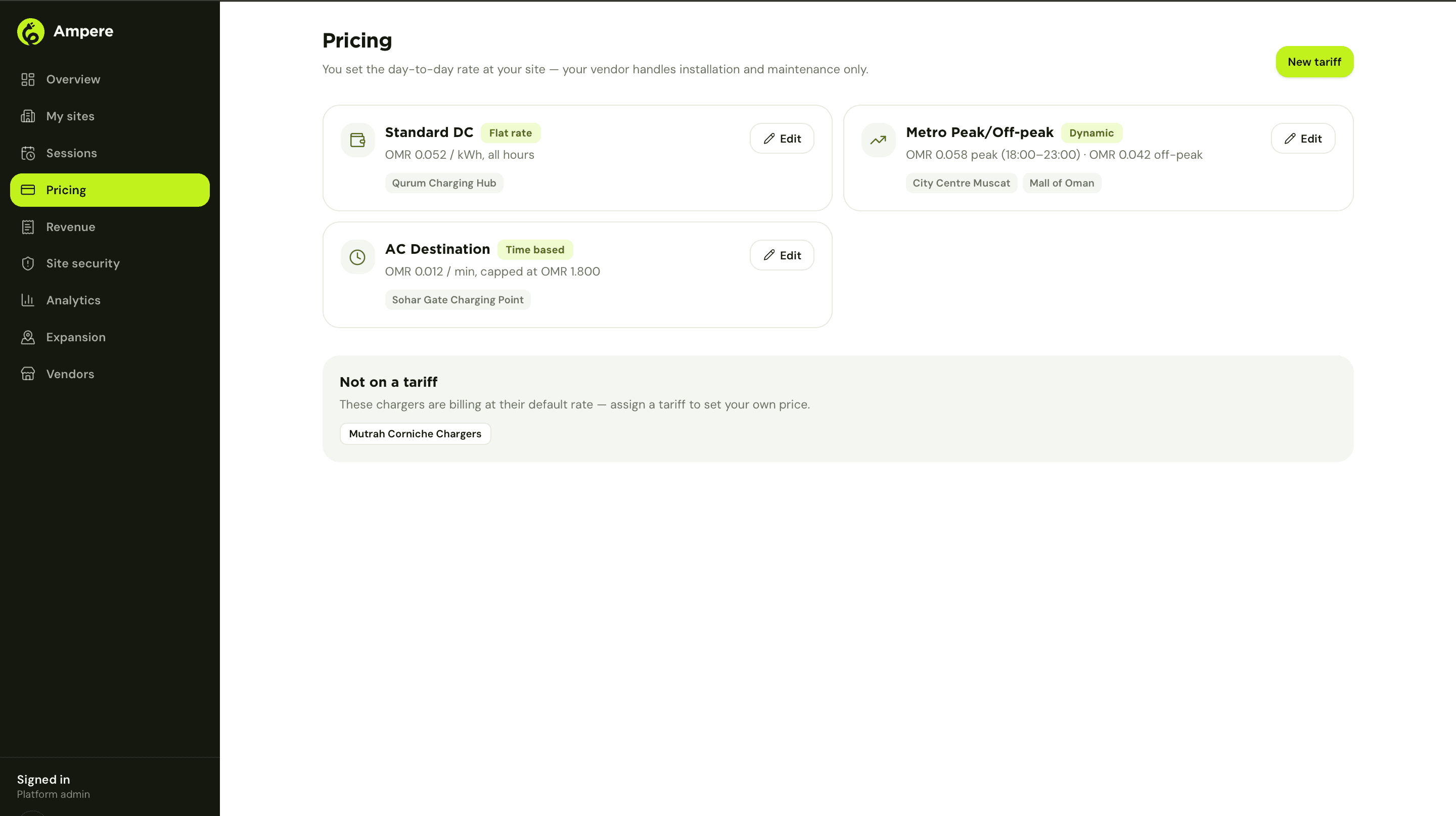
Owners set the day-to-day rate at their own site, flat, peak and off-peak, or time-based with a cap, while the vendor stays out of pricing entirely and handles installation and maintenance only. That split matters: the two things an owner actually controls, price and property, are the two things this dashboard hands them directly.
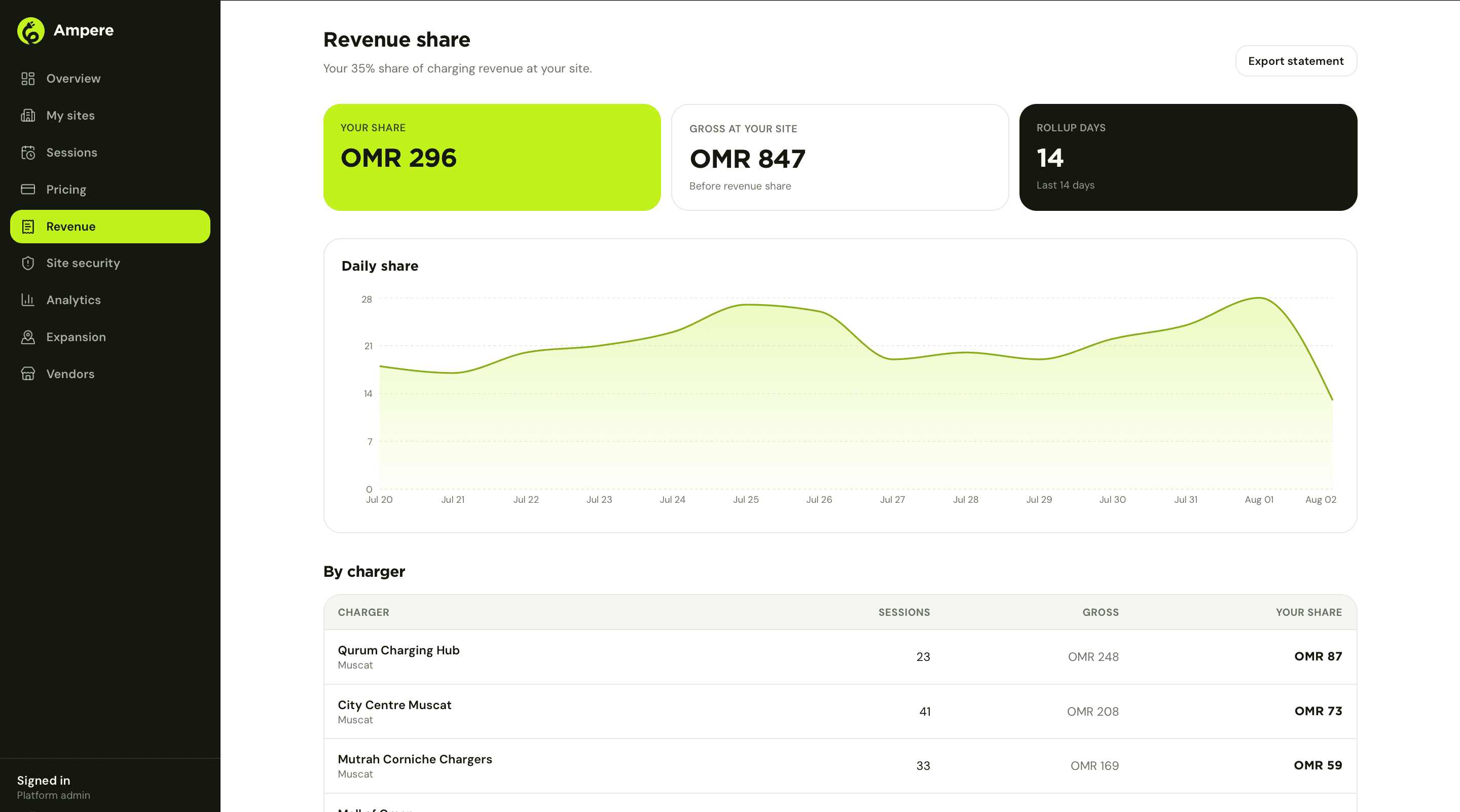
Revenue turns that rate into a number the owner can trust. A rolling daily chart of their share, a gross-versus-share breakdown, and a per-charger table down to the session, all exportable as a statement rather than something an owner has to reconstruct from memory at tax time.
Expansion, and a marketplace to act on it
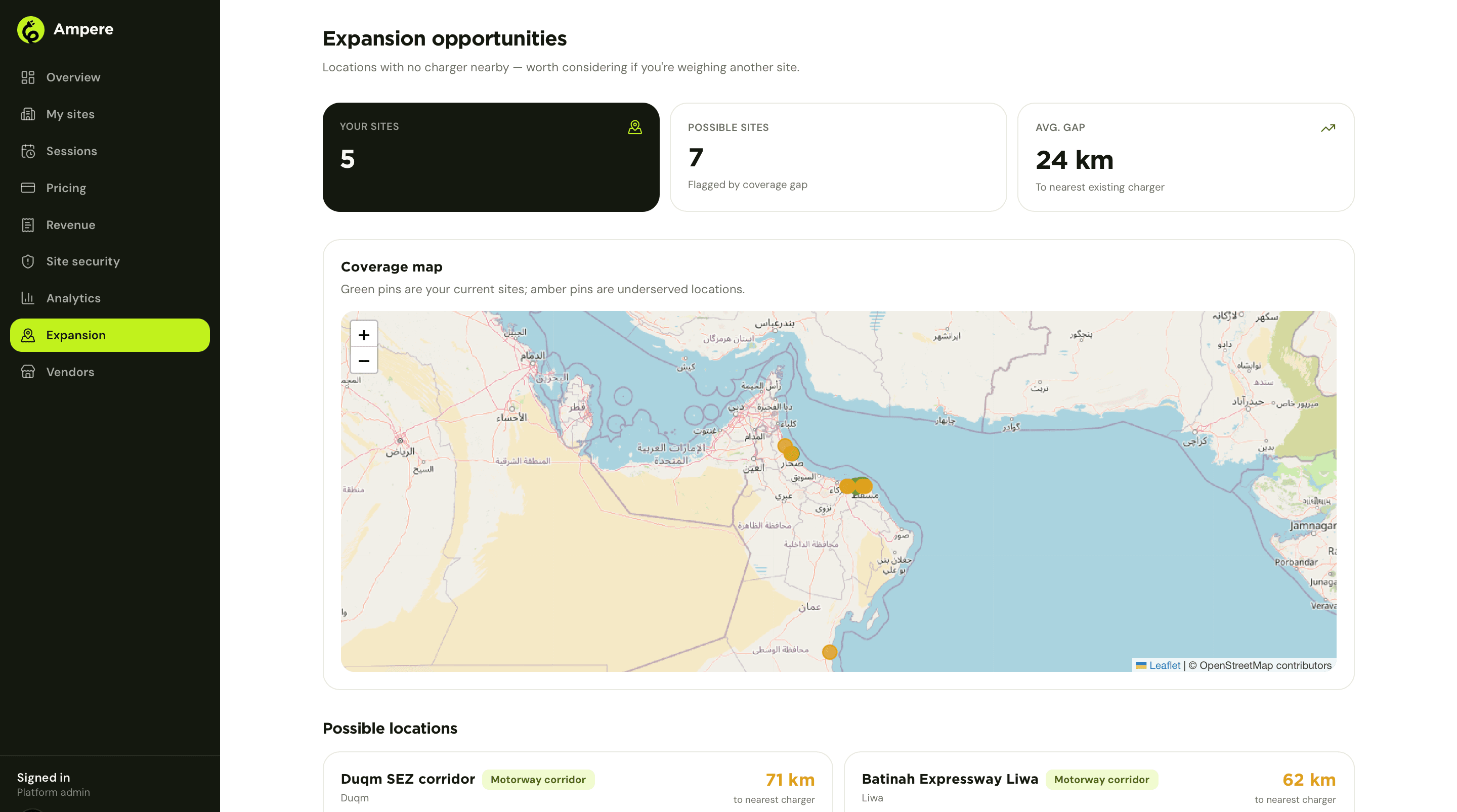
Because Ampere sees the whole map, not just one owner's sites, Expansion can show a site owner where their next bay would actually be useful: locations flagged for a coverage gap, ranked by distance to the nearest existing charger, plotted alongside the owner's current sites. It turns 'should we install a second charger' from a guess into a location an owner can point at.
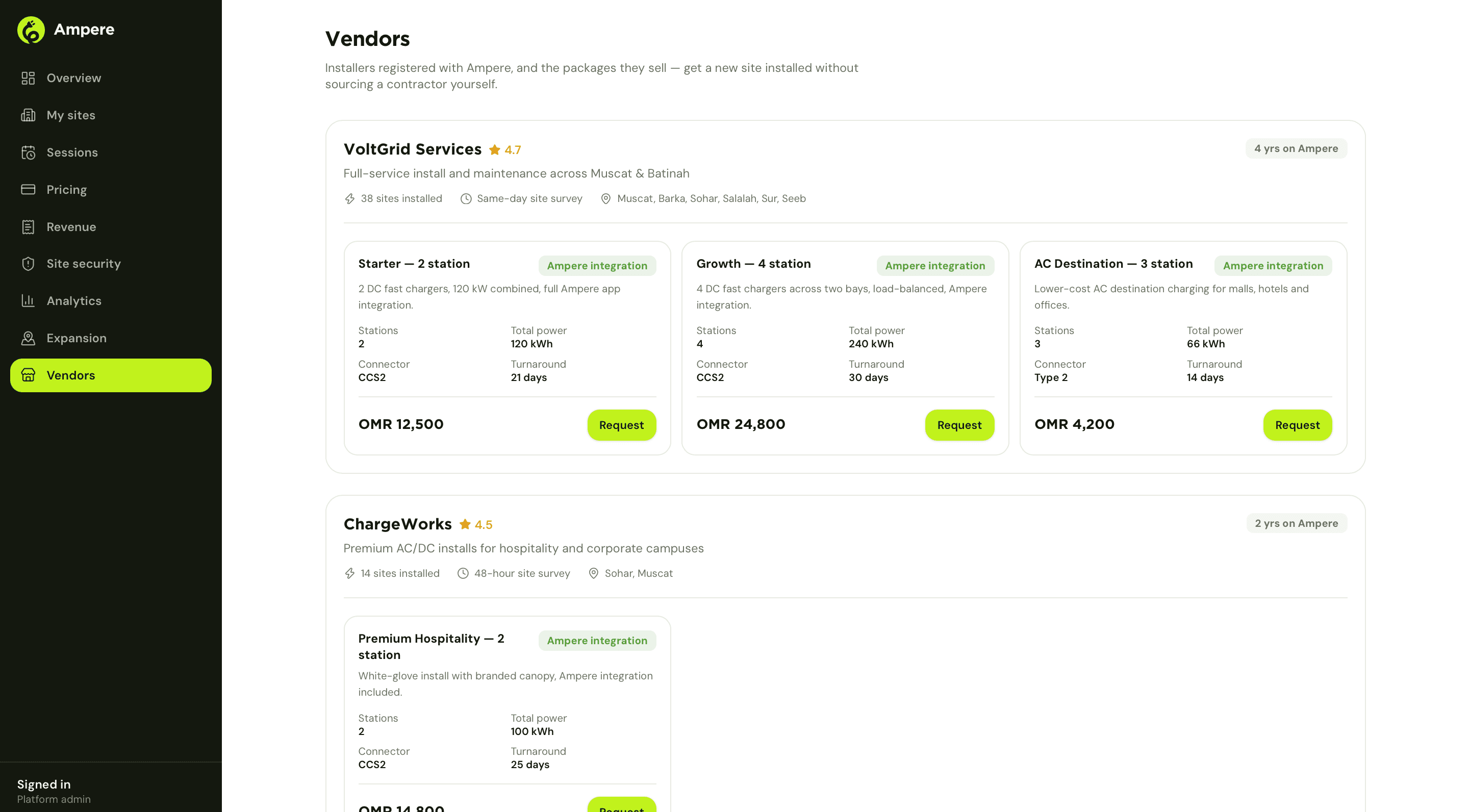
Choose vendors closes the loop that gap analysis opens. Installers registered with Ampere list their own packages, station count, connector type, turnaround time and price, right there, so an owner who decides to expand can request an install without leaving the dashboard or sourcing a contractor cold. The owner is still the vendor's customer; Ampere is just where they find each other.
Acting on it from a phone
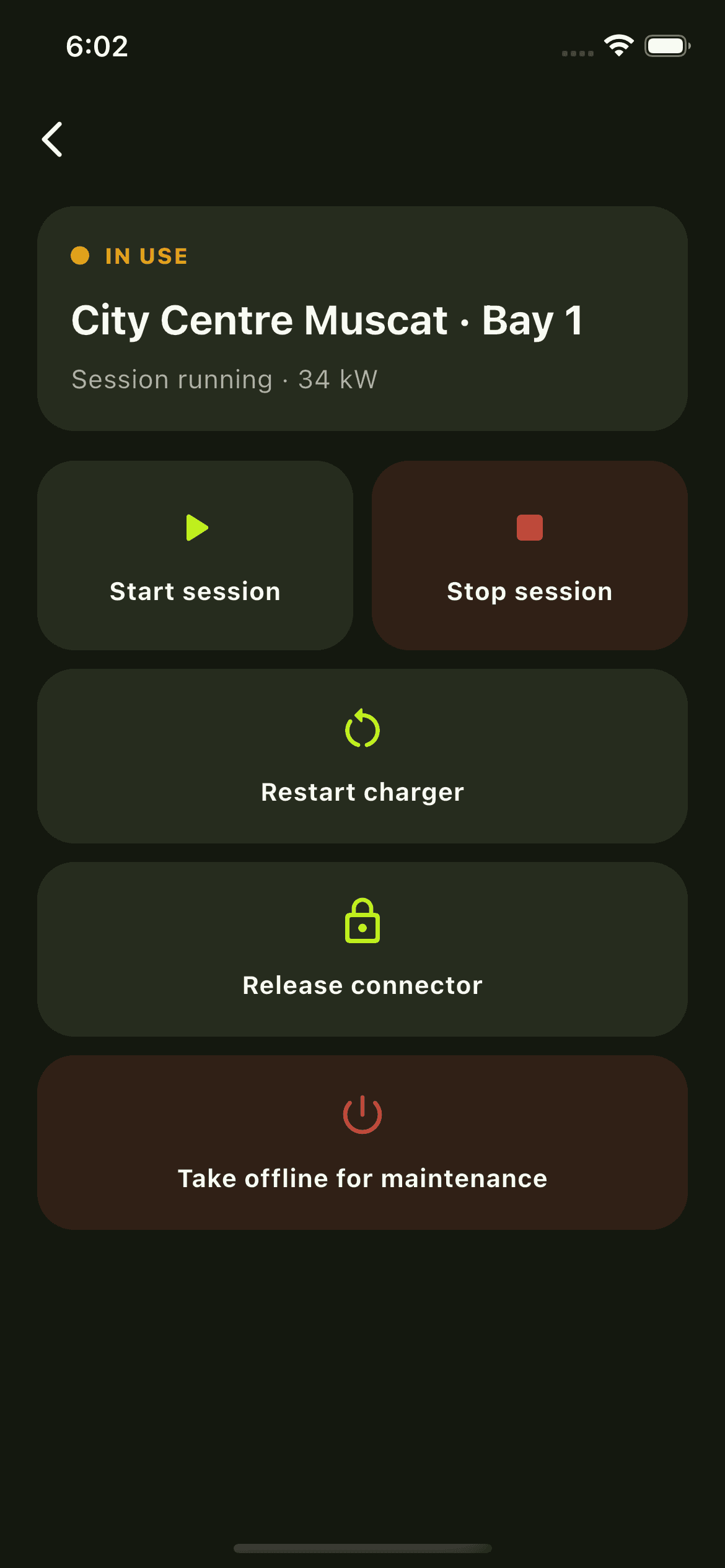
The dashboard is where an owner checks the numbers. When something needs fixing in the moment, that happens from a phone instead: restart a charger that has stopped responding, release a connector locked onto a car, or take a bay offline for maintenance so the app stops sending drivers to a unit that is not ready, without waiting for the vendor's technician to arrive.
What a driver sees
What the terminal owner sees
Chapter 04
Vendors: the installer's command center
A vendor's real business is everything that happens after the install truck leaves. The console is built for that half of the job.
A vendor's overview is a portfolio view across every terminal they have ever installed: how many are online, offline or faulted, how much of their installed base is actually reporting live telemetry, and, underneath, a map of every site coloured by status. Active customers and monthly recurring revenue sit next to it, because a maintenance business runs on both uptime and the retainer that uptime is supposed to justify.
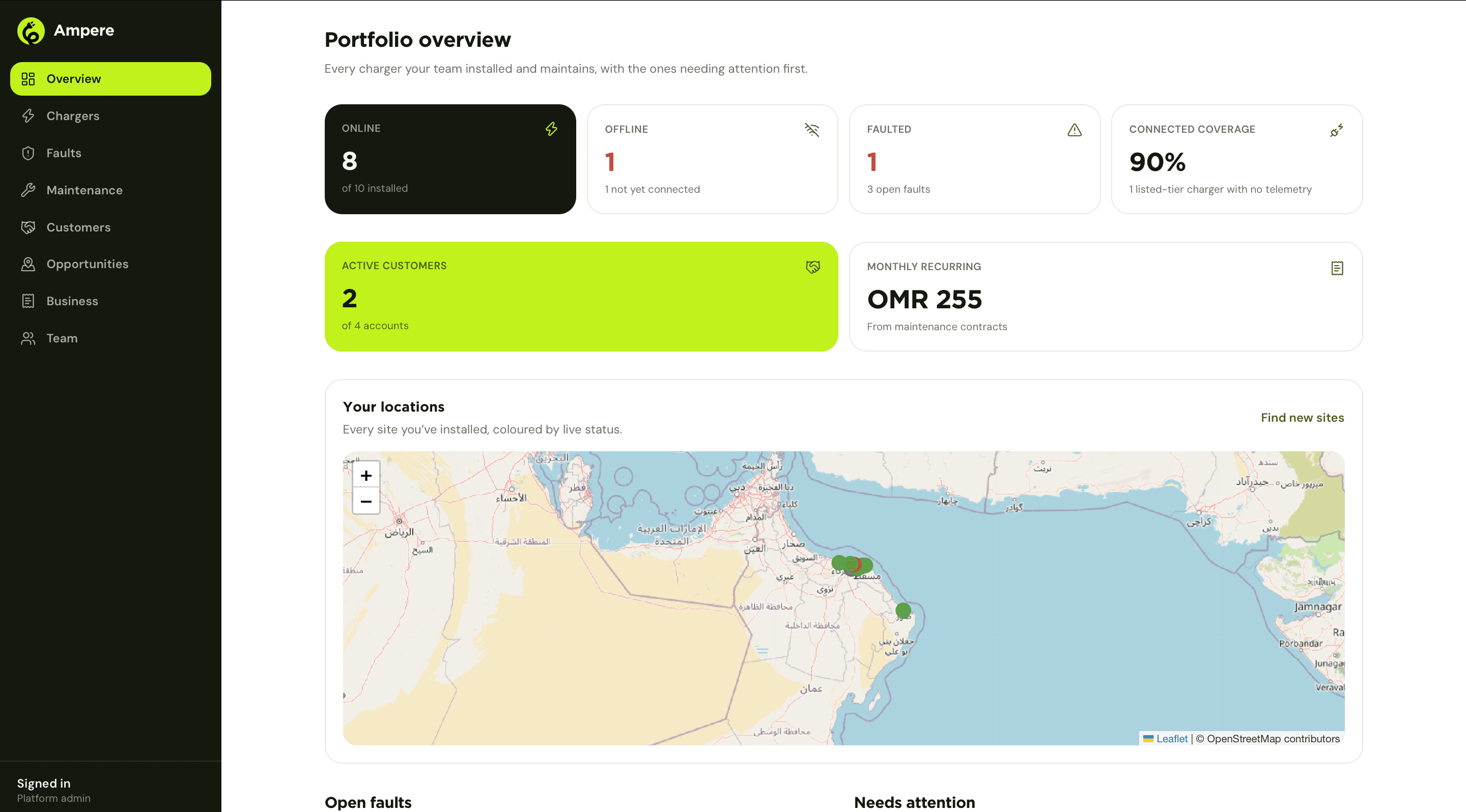
Faults, ranked by how much they cost to ignore
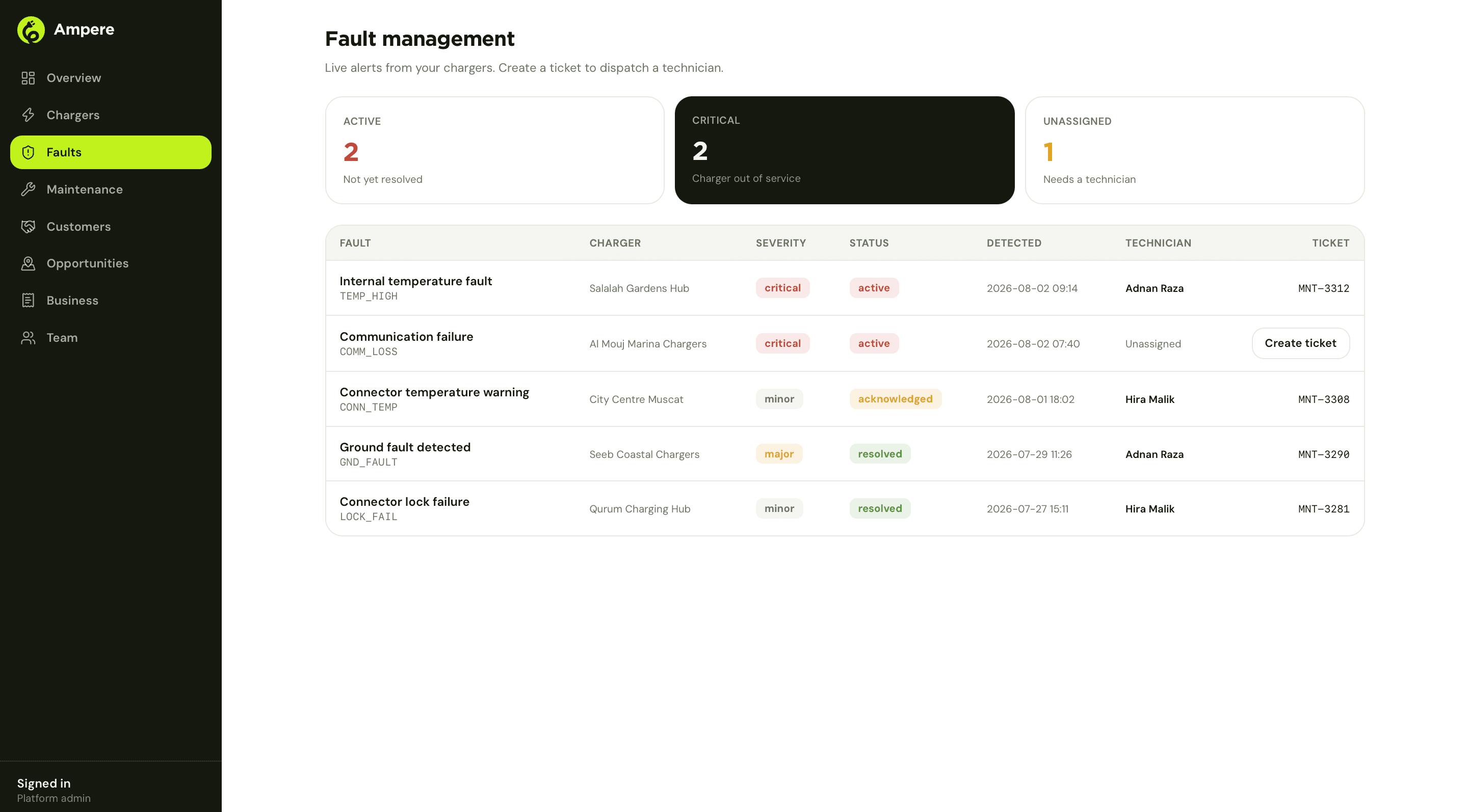
Fault management lists every alert coming off a vendor's chargers, ranked by severity, with the technician and ticket already attached once one is assigned. A critical fault, a charger genuinely out of service, sits apart from a minor connector-temperature warning, and an unassigned fault is a one-click dispatch away from becoming a job. This is the difference between a vendor finding out about a broken charger from a driver's complaint and finding out from the platform, before anyone has driven over expecting to charge.
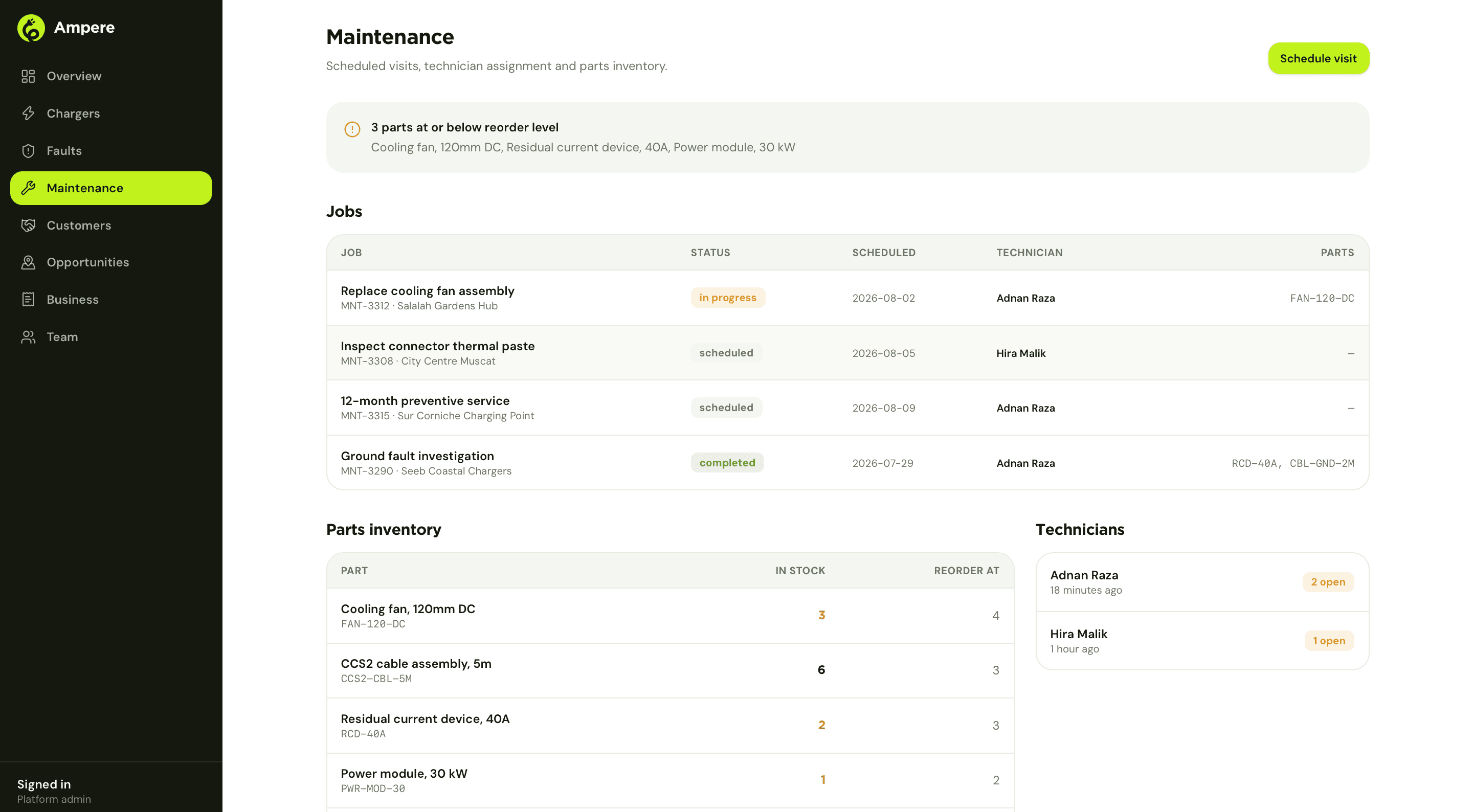
Maintenance is where a fault becomes a scheduled visit: jobs with a status, a technician and the parts they will need, plus a parts inventory that flags itself when stock drops to the reorder line. A technician heading to a site already knows what part to bring, which is the entire difference between a visit that fixes something and a visit that turns into a second visit.
The customer relationship, not just the hardware
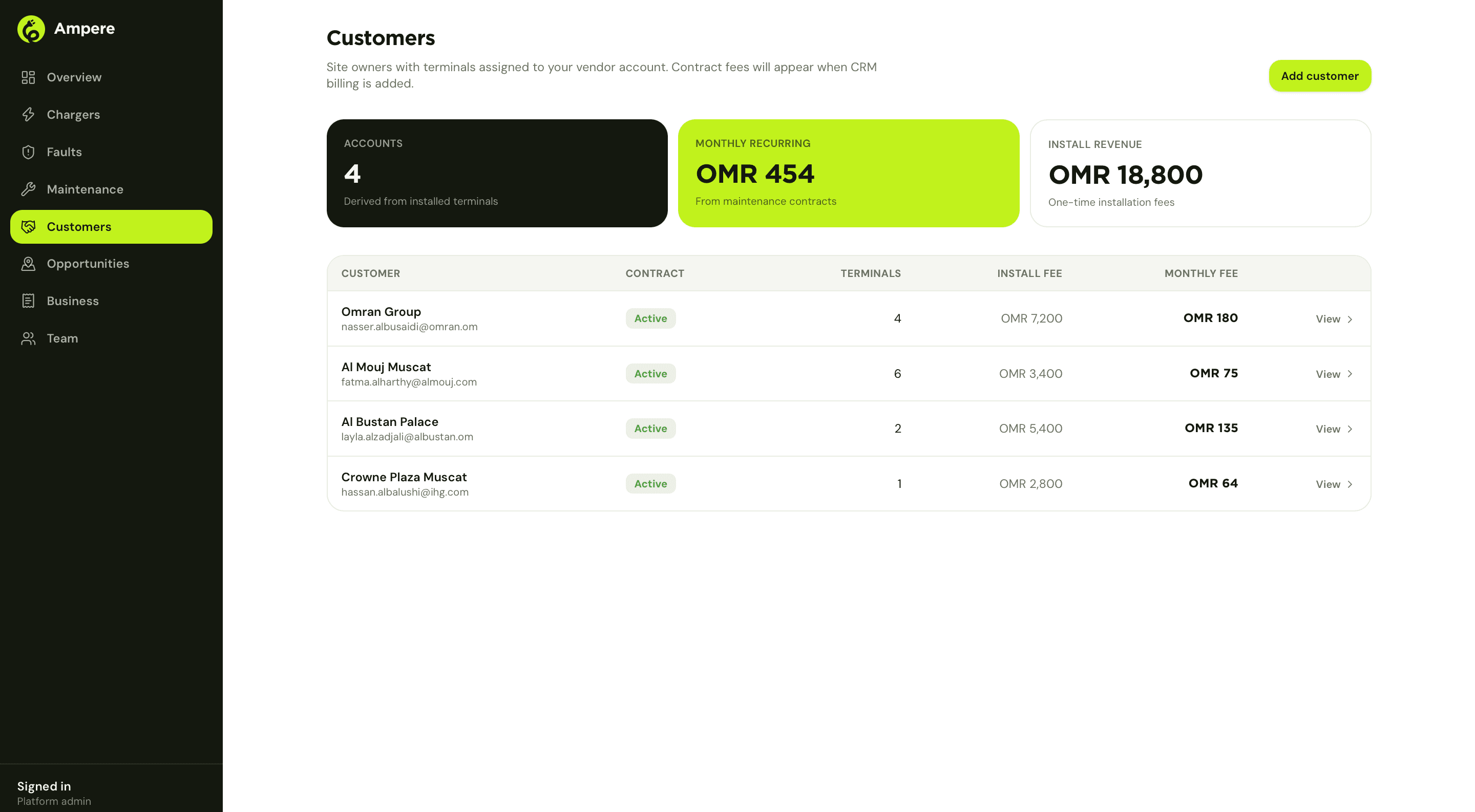
Customers lists every site owner with a vendor's terminals installed, the contract status, terminal count, and both the one-time install fee and the recurring monthly fee per account. Business rolls the same data up to totals, deliberately kept separate from a driver's charging revenue, which stays the site owner's alone. A vendor sells and services hardware; what a driver pays to charge a car is not theirs to see, and the platform enforces that boundary rather than asking anyone to respect it by convention.
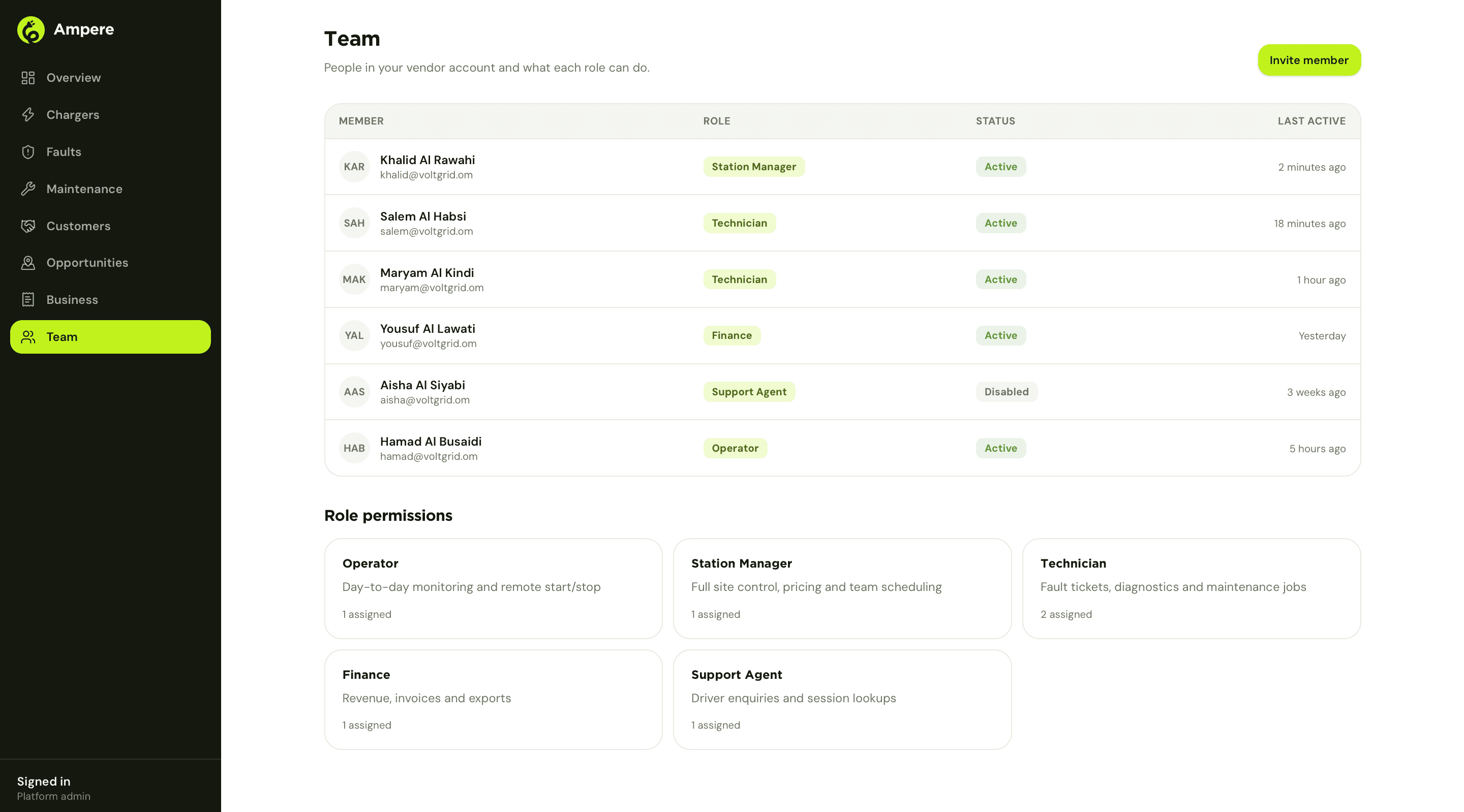
A team, not one login
Five roles inside a vendor account
- Operator: day-to-day monitoring and remote start or stop
- Station Manager: full site control, pricing and team scheduling
- Technician: fault tickets, diagnostics and maintenance jobs
- Finance: revenue, invoices and exports
- Support Agent: driver enquiries and session lookups
Six people at an installer are not six copies of the same login. The Operator role carries its permissions to a phone directly: day-to-day monitoring and a remote start or stop, without needing to be standing at the site when a session needs attention.
Chapter 05
Admin: running the network centrally
Somebody has to see across every vendor, every owner and every driver at once. The admin console is built to be that one seat.
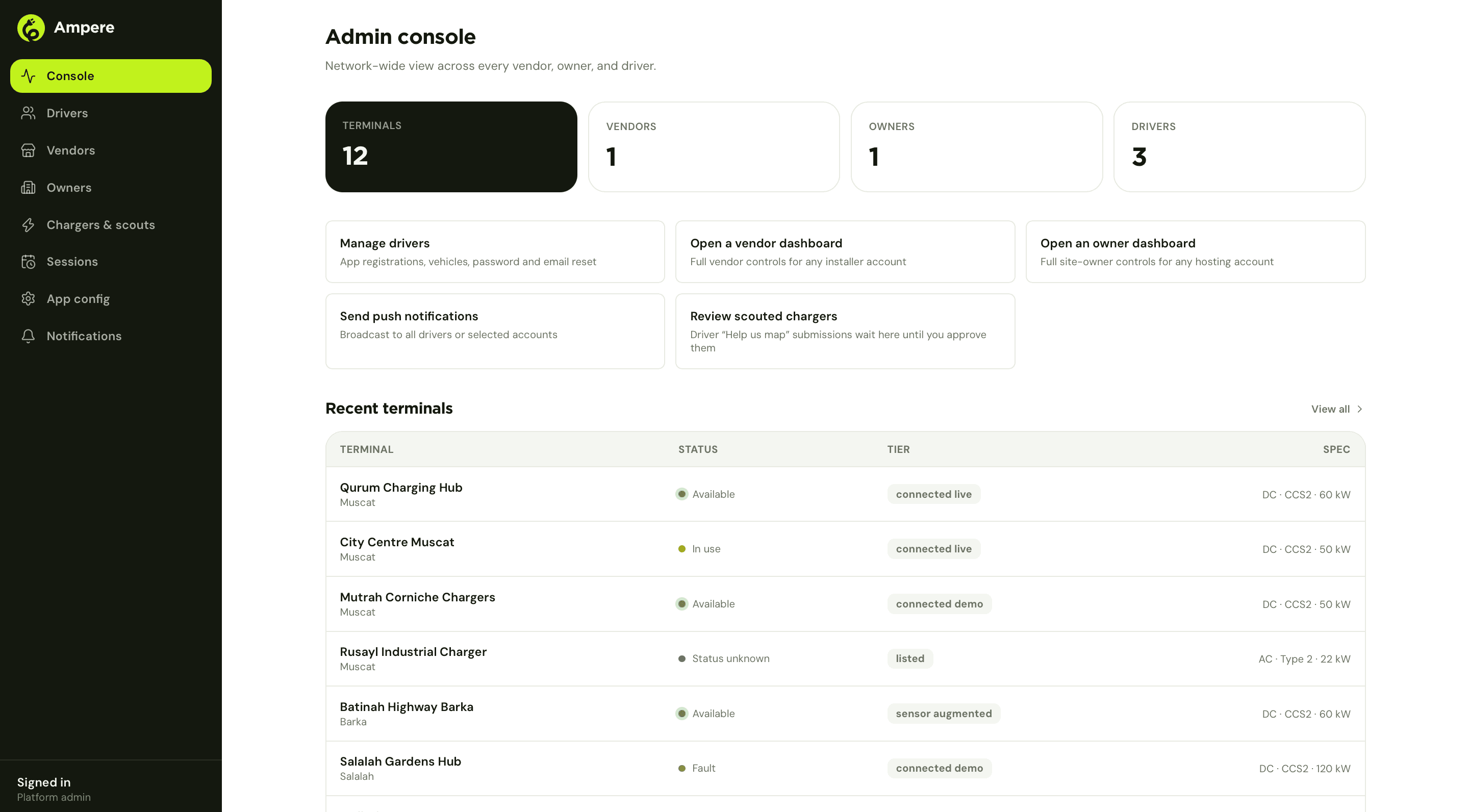
Console is the network-wide read: total terminals, vendors, owners and drivers, and a recent-terminals table that is also where the platform's connectivity tiers are visible at a glance. Below it, four direct actions: manage drivers, open any vendor's dashboard or any owner's dashboard with full controls for support purposes, broadcast a push notification to all drivers or a chosen set, and review chargers drivers have scouted through the app before they go live on the map.
A charger's tier is not decoration
Every terminal on the network carries a tier, and it is the same distinction the driver app enforces on the other end: whether a charger's status can be trusted, and how much.
The four tiers
- Listed
- A pin on the map. Location, plug type, price and hours, entered by hand. No live data behind it.
- Connected demo
- Wired in during onboarding or a pilot, reporting live, ahead of the vendor's full commercial handoff.
- Connected live
- Paired over OCPP 1.6J. Real-time status, remote start and stop, live fault alerts.
- Sensor augmented
- Connected live, plus the edge hardware: a screen at the bay and a camera on the connector.
Tier, What it means
Nothing in the app claims a tier it has not earned. A listed charger never shows a live badge to a driver, because it cannot back one up. That constraint sits in the schema, not in a style guide someone could forget to follow.
Vendors and drivers, at network scale
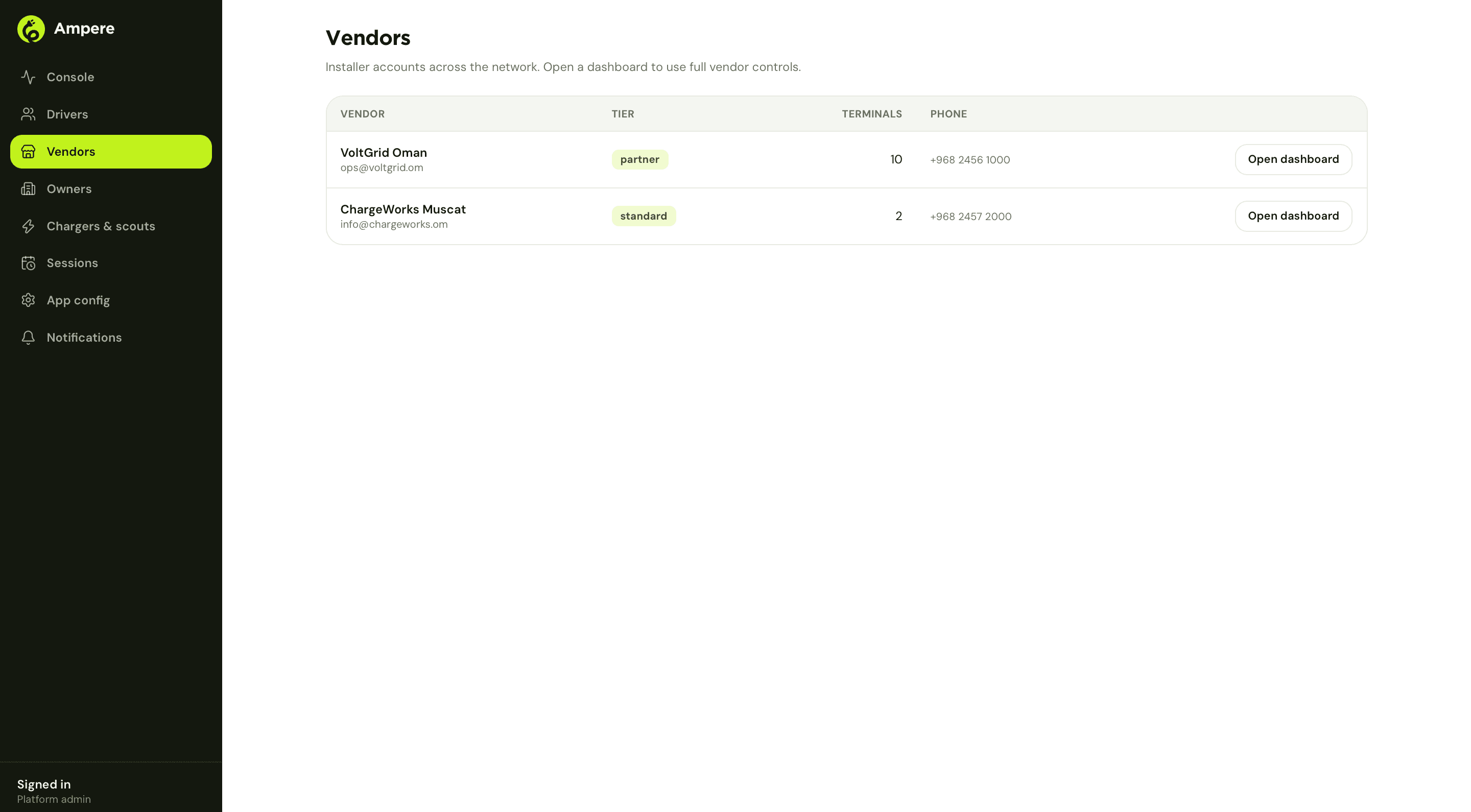
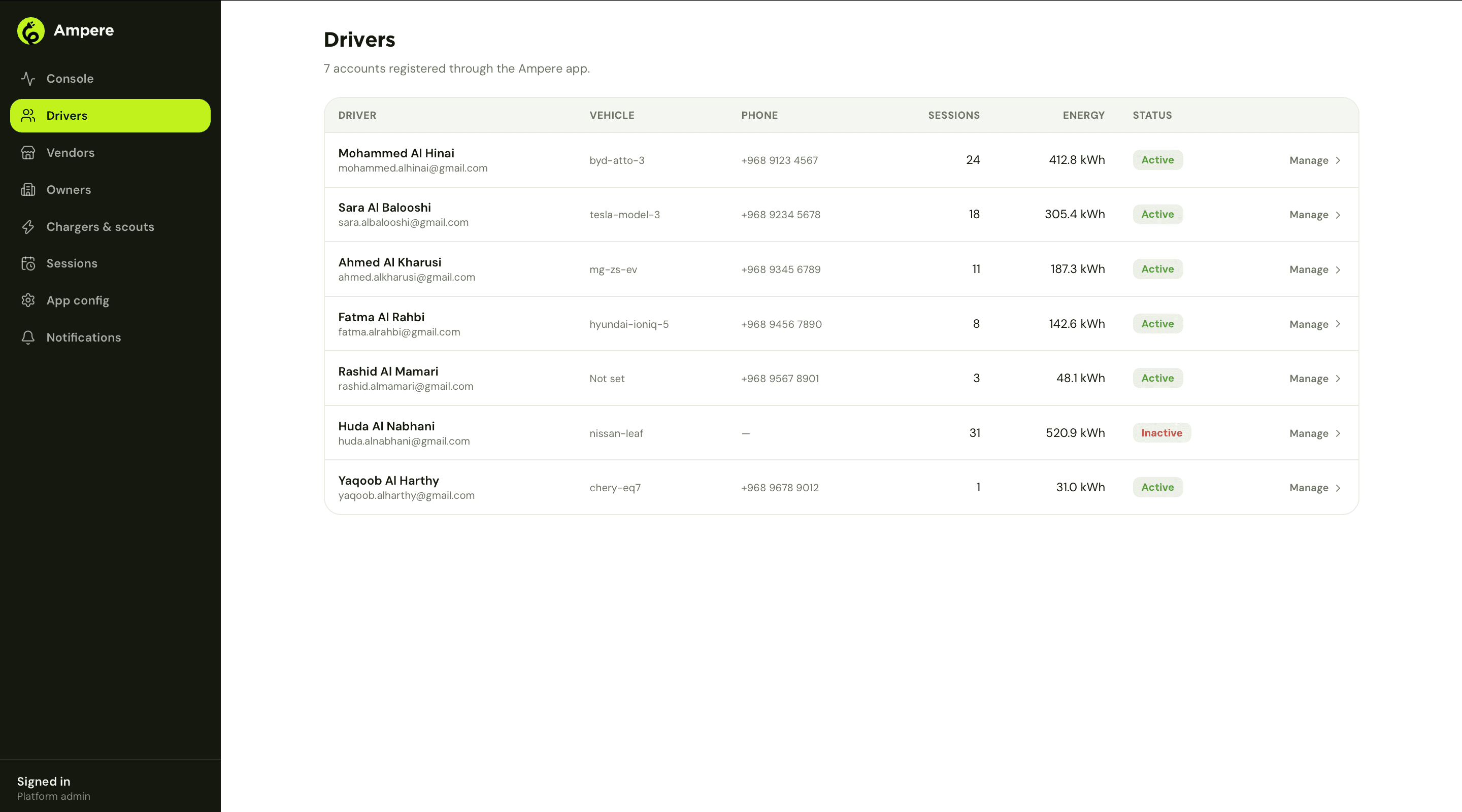
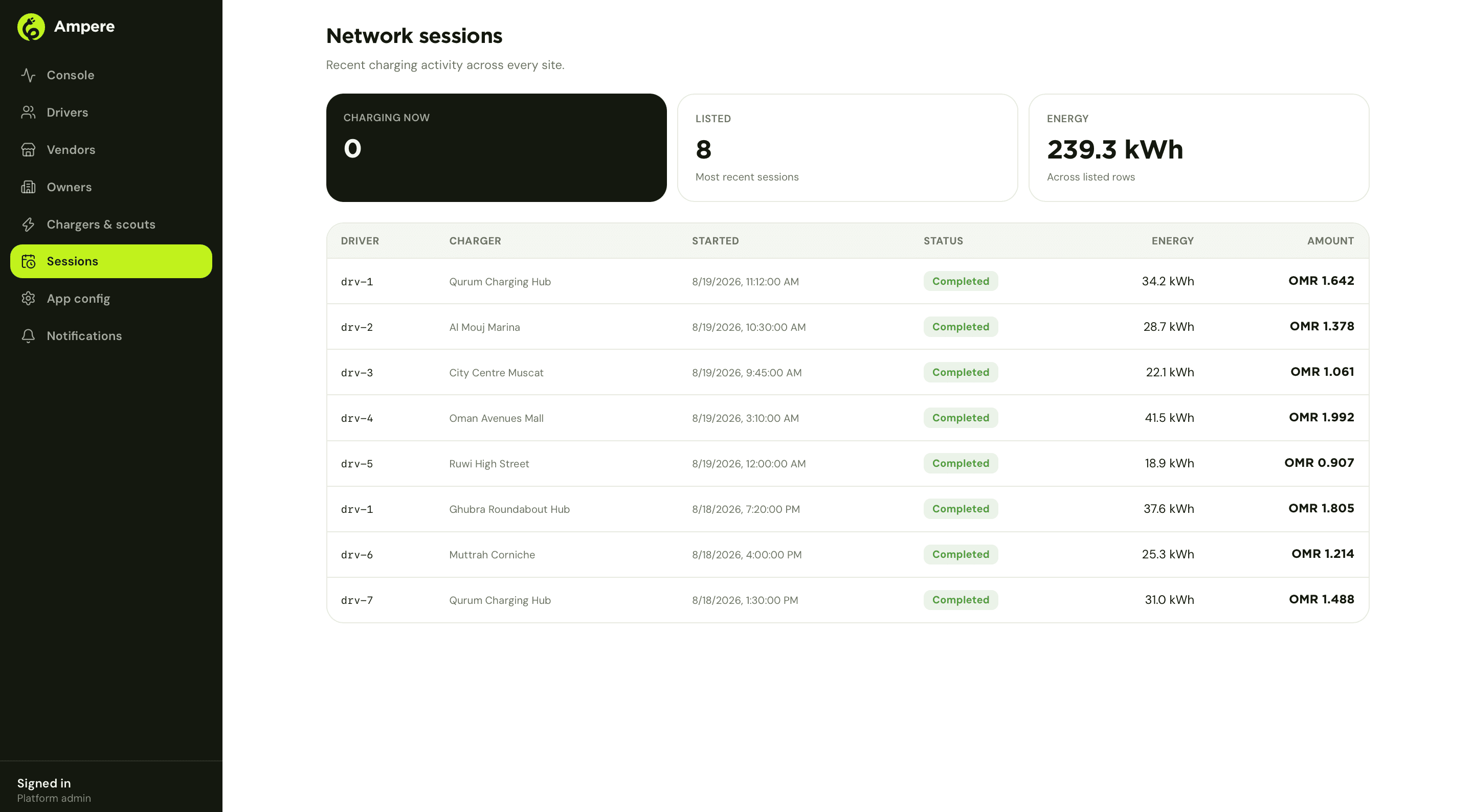
Vendors gives admin the installer roster: tier, terminal count and contact for every registered vendor, with a one-click 'Open dashboard' into that vendor's own console for support. Drivers is the same idea for the demand side: every registered account, their vehicle, session count and energy delivered, with status and a manage action per driver. Sessions closes the loop with a live feed of charging activity across every site on the network, the same session data an owner or a vendor sees, just at the scale of the whole platform rather than one account.
Chapter 06
What makes 'live' real: the OCPP layer
None of the live badges, the running cost, or the remote stop button mean anything unless a charger is actually talking to the platform. That connection is OCPP 1.6J.
OCPP 1.6J is the open protocol nearly every commercial charger already ships with, which is what makes connecting an existing terminal a configuration change during commissioning rather than a custom integration per charger model. Point a unit's OCPP endpoint at Ampere, accept the boot handshake, and the standard message set does the rest: BootNotification, Heartbeat, StatusNotification, MeterValues, RemoteStartTransaction, RemoteStopTransaction, Reset, UnlockConnector. The same handful of messages covers a 22 kW AC destination charger at a hotel and a 120 kW DC fast charger at a mall.
MeterValues is the message that carries almost everything a driver or an owner actually cares about: battery percentage, charging speed, energy delivered, running cost. The charging screen in Chapter 02 and the revenue chart in Chapter 03 are both, underneath, reading the same stream a charger was already generating for its own logs. Nothing about a connected charger required new sensors, only a place for the data it already produced to go.
Remote control is the same channel, in reverse
RemoteStartTransaction, RemoteStopTransaction, Reset and UnlockConnector are what put a start button in a driver's hand and a restart button in a terminal owner's. An owner clearing a stuck connector from their phone, in Chapter 03, and a driver starting a session from the app, in Chapter 02, are issuing the same class of command over the same connection, just from opposite ends of it and with very different permissions attached.
Chapter 07
Where it stands
Four applications, one schema, and a tier system that tells the truth about which chargers actually deserve a live badge.
Ampere runs today as four applications reading from the same terminals, the same sessions and the same faults, with permissions doing the work of keeping a vendor out of an owner's revenue and a driver out of either. The tier system, listed, connected demo, connected live, sensor augmented, is what lets the network grow honestly: a new charger can go on the map the day it is reported, and earn its live badge later, without the app ever showing a status it cannot back up.
4
Applications, one schema
4
Charger tiers
OCPP 1.6J
Direct terminal protocol
3
Cities live: Muscat, Sohar, Salalah
The pieces still ahead are the ones that need volume to be worth building: reservations, fleet accounts for companies running EVs at scale, and expanding the sensor augmented tier beyond the first sites now that the screen and camera hardware has proven out. All of it sits on the same OCPP connection already running today, which is the reason none of it requires touching a charger a second time.
How it ran.
- Phase 01Platform and role modelOne schema for terminals, sessions and faults, with four permission sets built in from the start: driver, terminal owner, vendor, platform admin.
- Phase 02Driver appHome, map, live charging session and terminal detail, built around a single question: is this charger free right now.
- Phase 03Terminal owner dashboardSites, pricing, revenue share, expansion analysis and a vendor marketplace to act on it.
- Phase 04Vendor consolePortfolio overview, faults, maintenance, customers, business and team, plus remote controls reachable from a phone.
- Phase 05Admin consoleNetwork-wide oversight of every vendor, owner and driver, the tier system, and the scouted-charger review queue.
- Phase 06OCPP integrationDirect OCPP 1.6J pairing for real terminals, plus the connectivity tiers that separate a listing from a live charger.
- OngoingMaintenance and roadmapSame team, four applications, onboarding more vendors and owners across Oman.
What we delivered.
Engineering.
- Driver app: home, map, live charging session, favorites, driver-submitted charger reporting
- Terminal owner dashboard: sites, sessions, pricing, revenue share, site security, analytics, expansion, vendor marketplace
- Vendor console: chargers, faults, maintenance, customers, opportunities, business, team and role permissions
- Admin console: network-wide terminal, vendor, owner and driver oversight, app configuration, push notifications
- OCPP 1.6J integration for connected terminals
- Four-tier connectivity model: listed, connected demo, connected live, sensor augmented
- Remote charger controls: start, stop, restart, unlock connector, take offline for maintenance
- Revenue share calculation and statement export for terminal owners
- Fault detection and maintenance ticketing with parts inventory
- Shared account and permission model across all four applications
Under it.
Web
- Dashboard applications for vendor, terminal owner and admin
- Role-based access control across one shared schema
- Map views built on Leaflet and OpenStreetMap
Mobile
- Driver app: live charging sessions, map, favorites
- Remote terminal controls for vendor staff
Integrations
- OCPP 1.6J for connected terminals
- Tiered connectivity model gating what the app is allowed to claim about a charger
What we would take from this one.
- 01Same data, four different jobsA terminal, a session and a fault look identical in the schema. What changed by role was never the data, only what each dashboard was allowed to do with it.
- 02Never show a badge you cannot back upA listed charger and a connected one look almost the same on a map. The live badge only appears where the platform actually has a live connection, which is what keeps the whole network honest as it grows unevenly.
- 03Close the loop you openExpansion analysis that tells an owner where to build next is only half useful if they still have to go find an installer cold. Choose vendors turns that insight into a request, inside the same dashboard.
- 04Remote control earns the retainerA fault a vendor can resolve from a phone, without a truck roll, is the difference a maintenance contract is actually supposed to buy. Building that control into the platform, not just the reporting, is what makes the retainer worth paying.
- 05Keep the boundaries in the schema, not the UIA vendor never sees a site owner's charging revenue, and an owner never sees another owner's sites. That is enforced in what each role's queries are allowed to return, not by trusting a screen not to show it.
Still to come.
- Reservations and slot booking for connected chargers
- Fleet accounts for companies running EVs at scale
- Expanding the sensor augmented tier beyond the first sites
- More vendors and owners onboarded beyond Muscat, Sohar and Salalah
Got something at the stage Ampere was at?