Case study · 11 min read
Sahara Health.
A clinic platform built around the two things a front desk actually does all day: work out who is next, and take the money.
Sahara is a clinic management platform for Gulf practices: patient registration, a live outpatient queue, appointment scheduling and billing, in Arabic and English, running per clinic and per doctor. It is with 19 clinics and 56 doctors today, and we are still shipping to it.
It is built around the front desk rather than the back office. The screens a receptionist touches forty times a day got the attention: find this patient by phone, issue a token, call the next one, take a cash payment and print the invoice.
Healthcare data shaped the build from the first meeting. What a receptionist can see is not what a practitioner can see, and a patient record has to survive being migrated off whatever the clinic used before.
- Client
- Sahara Health
- Sector
- Outpatient clinics · Gulf
- Market
- United Arab Emirates
- Engaged
- 2026 to present
- Divisions
- Engineering
- Products shipped
- Clinic management platform
- Interface
- Bilingual, Arabic and English
- Scale
- 19 clinics · 56 doctors
- Status
- Live.
19
Clinics running on the platform
56
Doctors using it daily
2
Languages, first-class in every screen
OPD
Live token queue, walk-in and online
AED
Multi-line invoicing with tax presets
1
Patient record, phone-number addressable
Contents
Chapter 01
The queue is the product
Most clinic software is designed for the practice manager. The people using it all day are on the front desk, and their job is a queue.
Walk into an outpatient clinic in the Gulf at ten in the morning and the bottleneck is never the medical record. It is the twenty people in the waiting room, some of whom booked online, some of whom walked in, all of whom want to know how long this is going to take.
Before Sahara, that was a paper token roll and a receptionist shouting a number. Which patient is currently with the doctor, who is next, and how many are still waiting existed in one person's head, and left the building when they went to lunch.
What we built the platform around
The front desk's actual day
- Find a returning patient in seconds, from the only identifier they reliably know: their phone number.
- Register a new one without stopping the queue — Emirates ID, date of birth and a photo, most of it optional at the desk.
- Issue a walk-in a token that slots correctly against patients who booked online.
- Call the next patient, and be able to go back when someone does not answer.
- Take a payment in cash, settle the invoice, and print it, without leaving the visit.
Chapter 02
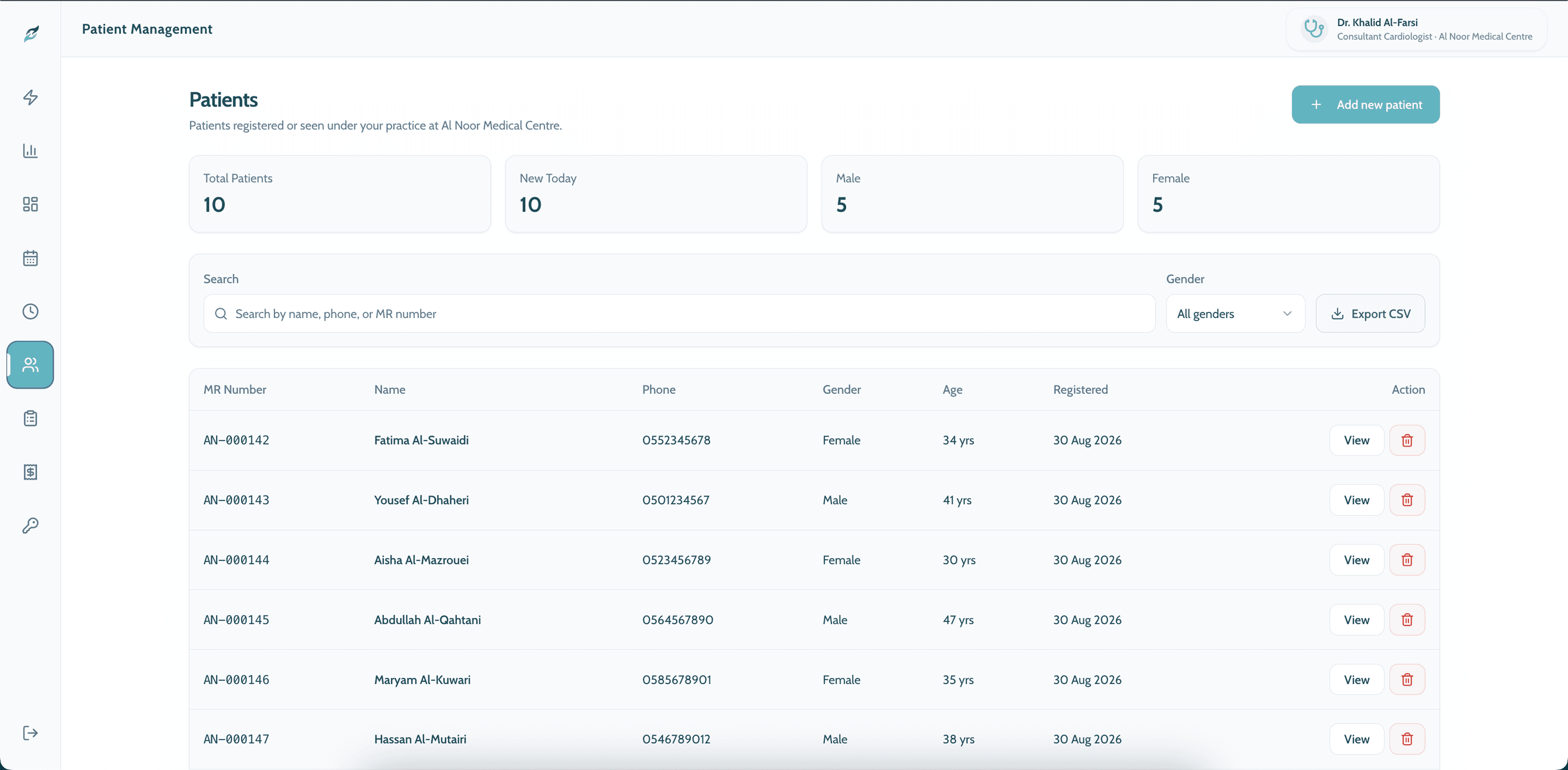
One patient record, addressable by phone number
The record everything else attaches to, and the one thing that had to survive migration off whatever the clinic used before.
Registration assigns an MR number and captures what the clinic is actually required to hold: full name, Emirates ID, date of birth, gender, address, and an optional patient photo. Most of it can be filled in later — what cannot wait is the phone number, because that is how the patient will be found again.
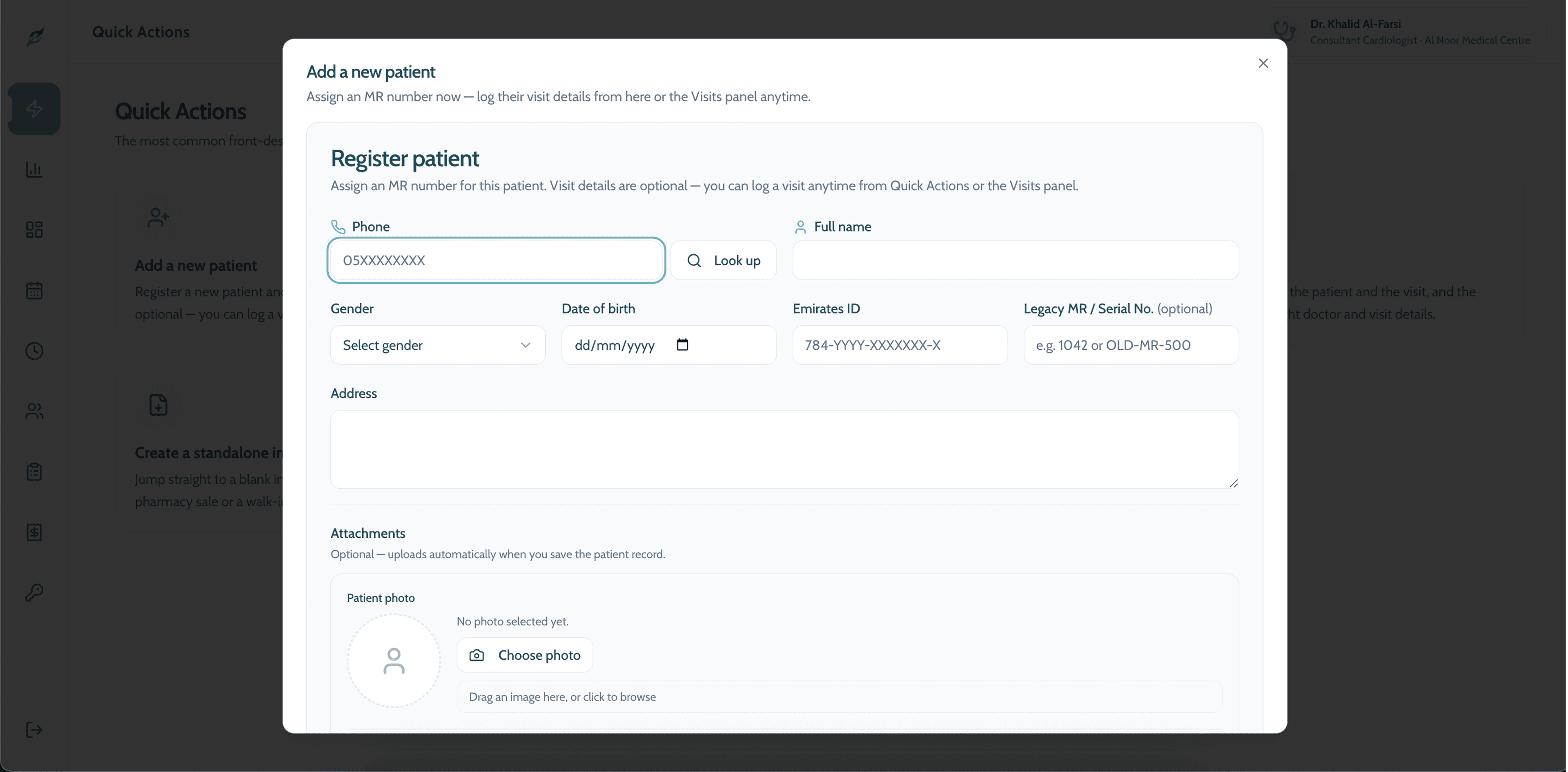
The legacy MR field is the migration story
A clinic adopting Sahara has years of existing records under its old numbering — a serial from a paper ledger, or an MR from the system it is leaving. The registration form carries a Legacy MR / Serial No. field for exactly that, so an old chart number stays searchable after the switch instead of becoming a number nobody can resolve.
It is a small field doing unglamorous work. It is also the difference between a clinic that can migrate and a clinic that quietly keeps the old system running alongside the new one.
Chapter 03
The live queue
A token board that both the front desk and the patient can see, and that knows the difference between a booking and a walk-in.
The OPD queue console is the screen the clinic leaves open all day. It shows the token currently being called, how many are booked, how many are waiting, and the split between patients who booked online and patients who walked in.
Calling the next patient is one action. So is going back, which sounds trivial until you have watched a receptionist advance the queue past someone who stepped out to take a call.
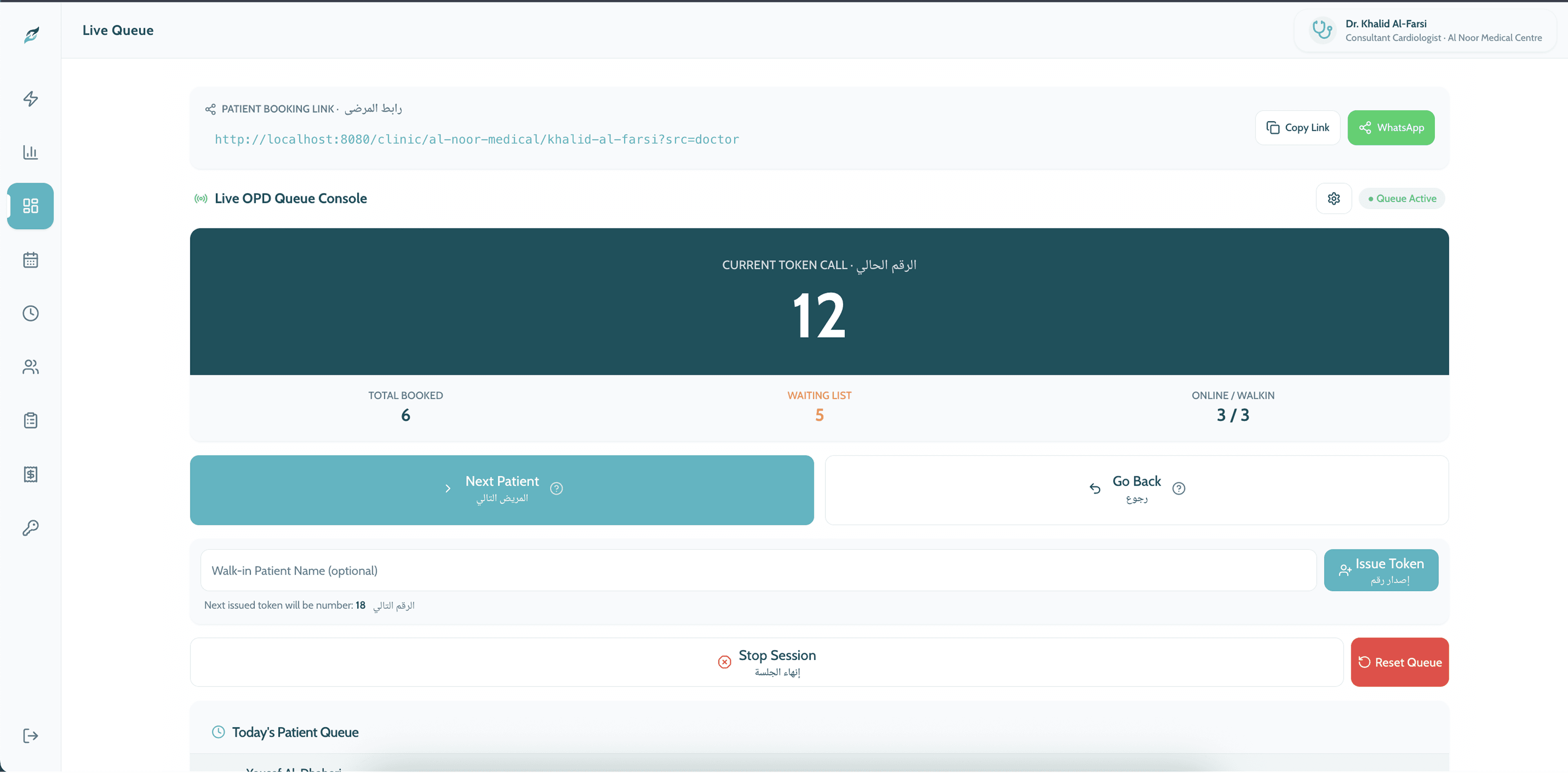
Walk-ins are issued a token from the same console, with the next number shown before it is issued, so the desk can tell someone what they are getting before committing to it.
Chapter 04
Slots, generated rather than typed
Clinic hours are a rule, not a list. The scheduler takes the rule and produces the slots.
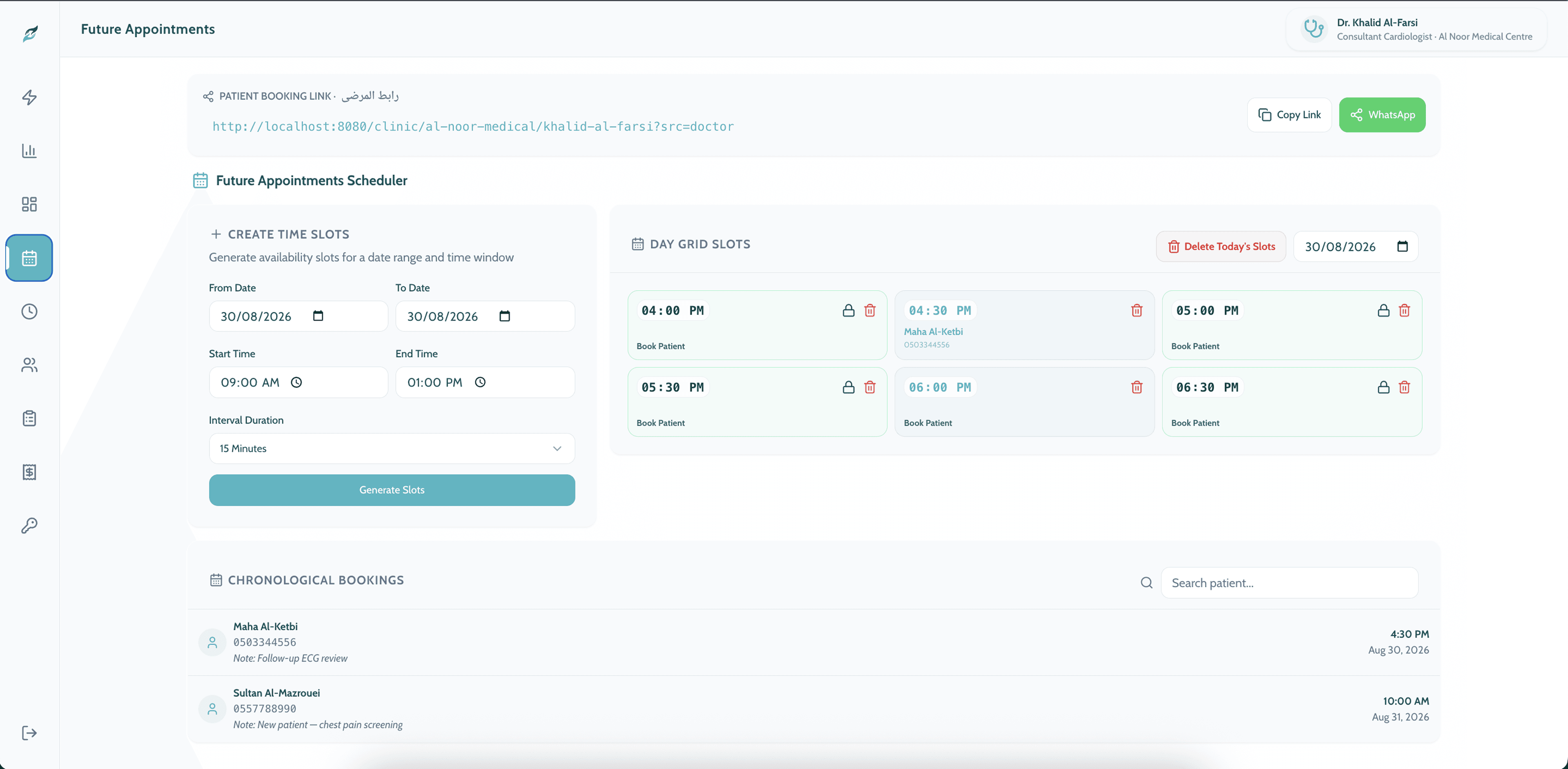
A doctor's availability is usually a sentence: four till seven, Sunday to Thursday, fifteen minutes each. Making a receptionist enter that as individual slots is how clinics end up with half a calendar filled in and the rest missing.
The scheduler takes the date range, the time window and the interval, and generates the grid. Individual slots can then be locked, deleted, or booked against, and a day's slots can be cleared in one action when the doctor cancels a session.
Chapter 05
Billing that starts from the visit
An invoice built from the patient who was actually just seen, settled at the desk, in the currency and payment modes the clinic really uses.
Billing starts where the visit ended: find the patient, by MR number, by name or phone, or off the list of who has just been seen. That ordering matters. An invoice flow that starts with a blank form and asks for a patient last is an invoice flow that gets abandoned when the queue is six deep.
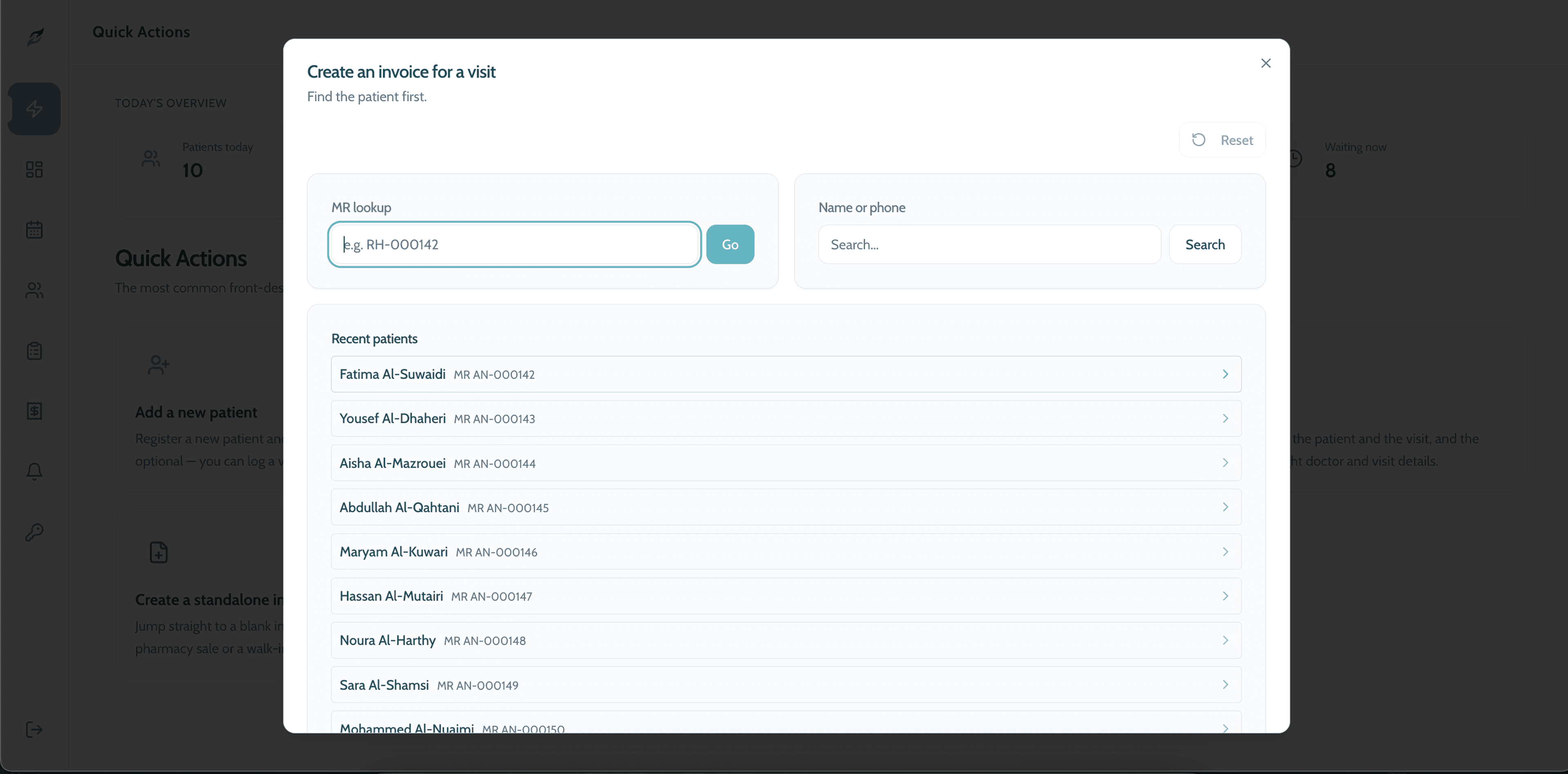
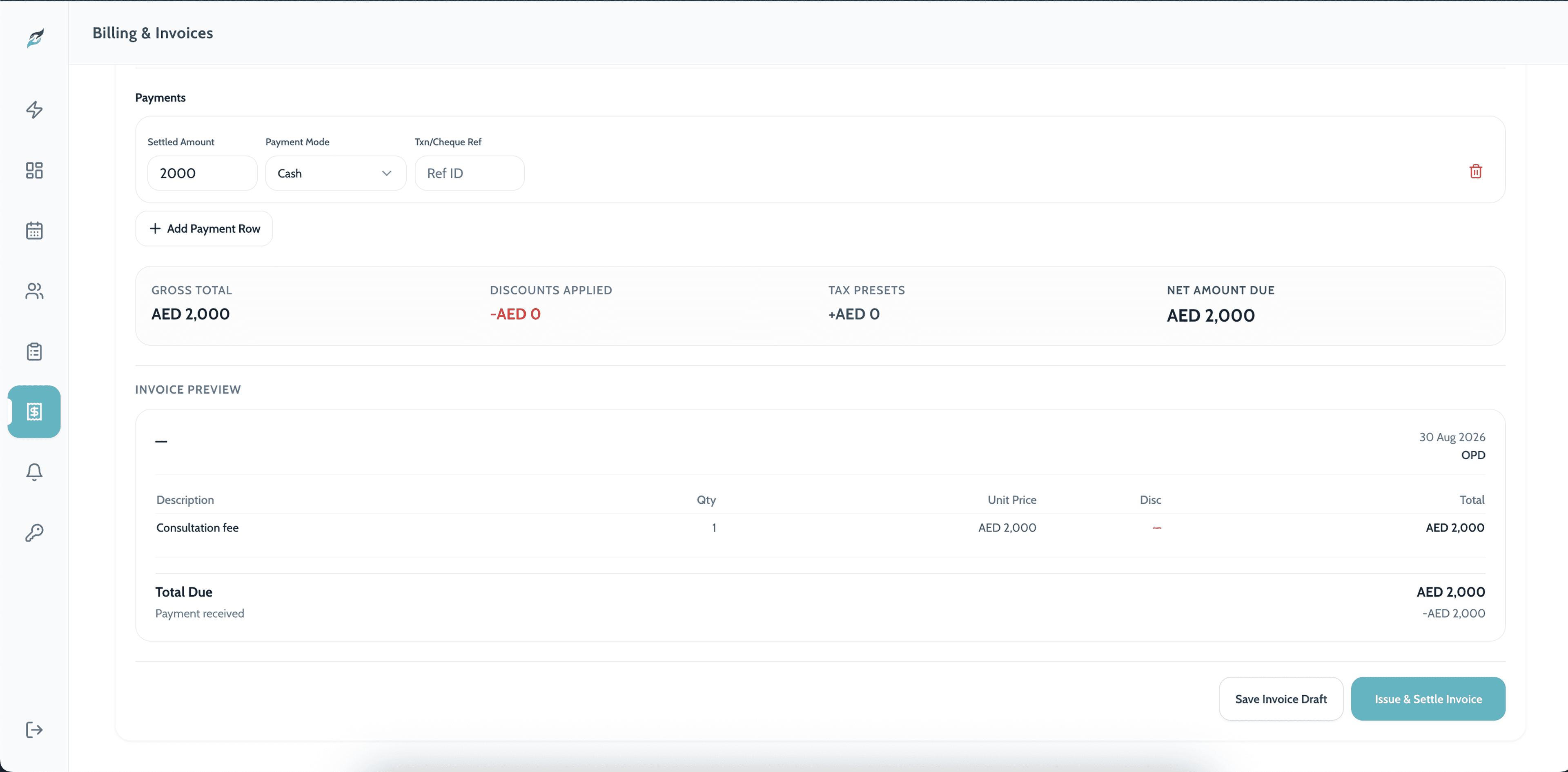
Line items, payment rows, and a preview the patient can be handed
The invoice builder handles multiple line items with quantities and per-line discounts, multiple payment rows against a single invoice, and tax presets applied on top. Payment modes are the ones a Gulf clinic actually takes, cash included, with a transaction or cheque reference where one exists.
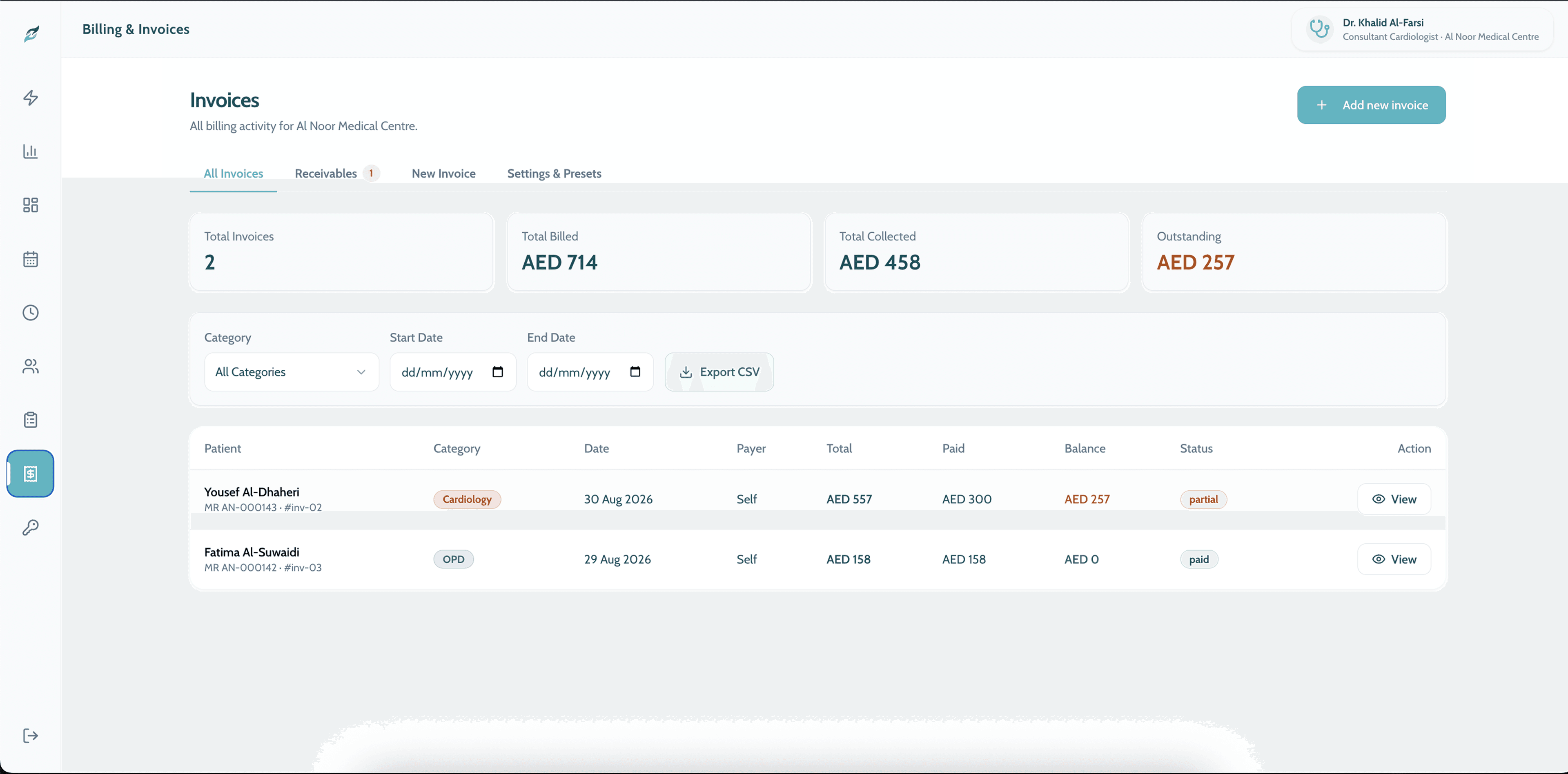
Part-payment is a first-class state rather than an edge case: an invoice can be issued, partly settled, and carry a running balance, which is what happens in practice when a patient pays some now and the rest on the next visit.
Chapter 06
Where it stands
A working clinic platform: register, queue, schedule, bill, in two languages.
Sahara runs the operational day of a clinic. A patient is registered once and found by phone number afterwards. A queue has a state the whole desk can see. A doctor's availability is generated from a rule instead of typed. A visit becomes an invoice, and the invoice can be part-settled in cash without leaving the screen.
The platform is tenanted per clinic and per doctor, which is what makes the booking links work and what the next clinic onboards into.
How it ran.
- Phase 01DiscoverySitting with the front desk rather than the practice manager, and mapping what actually happens between a patient arriving and a patient paying.
- Phase 02Patients and registrationMR numbering, Emirates ID capture, phone-first lookup, and the legacy-MR field that lets a clinic migrate off its old numbering.
- Phase 03Queue and schedulingThe live OPD token console, walk-in token issuing, generated appointment slots, and per-doctor WhatsApp booking links.
- Phase 04BillingVisit-linked invoicing, multi-line items with discounts, multiple payment rows, tax presets, and receivables tracking.
- OngoingMaintenance and roadmapSame team.
What we delivered.
Engineering.
- Bilingual Arabic/English clinic platform
- Multi-tenant structure: clinic, then doctor
- Patient registration with Emirates ID and photo capture
- Legacy MR / serial migration field
- Phone-first patient lookup and searchable directory
- Live OPD token queue with walk-in issuing and go-back
- Per-doctor public booking links, shareable over WhatsApp
- Appointment slot generation over a date and time range
- Day grid with lockable and deletable slots
- Visit-linked invoicing with line items and per-line discounts
- Multiple payment rows, payment modes and transaction references
- Tax presets and invoice preview
- Receivables and outstanding-balance tracking
Under it.
Platform
- Clinic management web application
- Multi-tenant: clinic and practitioner scoped
- Bilingual interface, Arabic and English
Front desk
- Live queue console
- Token issuing for walk-ins
- Public per-doctor booking links
Billing
- Visit-linked invoice builder
- Multi-row payments with mode and reference
- Tax presets and discounts
What we would take from this one.
- 01Build for the busiest person in the buildingThe practice manager specifies the software and the receptionist uses it four hundred times a day. Optimising for the second one is what makes the first one's reports accurate, because the data only exists if the desk had time to enter it.
- 02A migration field is worth more than a migration toolOne optional legacy-MR box on the registration form did more for adoption than any bulk import would have. Clinics move across gradually, and the old number has to keep working during the overlap.
- 03Bilingual belongs in the layout, not in a settings screenPutting Arabic and English side by side on the operational screens costs a little space and removes an entire class of mistake — nobody has to notice what language the interface is in before they can act.
- 04Part-payment is the normal caseModelling an invoice as paid or unpaid would have been simpler and wrong. Clinics settle in instalments constantly, and a system that cannot express that gets worked around in a notebook.
Still to come.
- Patient-facing app: booking and visit history from a phone
- Insurance and payer workflows beyond self-pay
- Recall and follow-up reminders tied to treatment plans
- Onboarding further clinics and practitioners onto the platform
Got something at the stage Sahara Health was at?